Rippora
A pool and spa water app built with Flutter. Photograph a test strip and an AI model matches each pad to its printed scale; the person confirms every pad, and the phone does every sum after that: how much of each product to add for this pool's volume, in which order and with which waits, and whether the water leans corrosive or scaling. A Laravel key proxy with an admin panel and a one-page product website are in the same download.
Flutter and Material 3Gemini, OpenAI, Claude or your server Demo mode needs no keyDark and light English, Spanish, ArabicLaravel key proxy included Landing page included
1Rippora, from strip to dose
Rippora is an app for the person who looks after a pool or a spa. They dip a test strip, hold it beside its bottle and take one photo. An AI model matches each pad to the color scale printed for it, the person confirms every pad with a tap, and from then on the phone does all the arithmetic itself: how much of each product to add for this pool's volume and the strength on the product's label, in which order, how long to wait between them, and whether the water leans corrosive or scaling.
The line between the two halves is the product. The model is asked for a position on a printed scale, never a number of its own and never advice; the reply it can send has no field for a dose, a brand or a verdict on safety. Every dose, wait and balance figure is worked out by 4 small pure-Dart engines, so it is the same on every phone and can be checked by hand.
The download holds three things:
- The Flutter app (
rippora_ai_app/) with 22 screens, dark and light, 3 languages, and a Demo mode that answers on the device with no key and no network. - A Laravel back end (
backend/): a key proxy that holds your AI provider keys on your own server and runs only this app's three jobs, with per-device and server-wide spending caps, a usage log, a copy of the strip photos read through it, and a Filament admin panel. - A one-page product website (
landing/), a self-contained HTML file in the app's own colors and typefaces.
Out of the box the app opens in Demo mode on a sample household: 3 pools (a backyard pool, a salt water pool and a hot tub), 12 tests across five weeks, 7 products on the shelf and the equipment that needs looking after, so every screen is populated the moment it opens. Add a key of your own, or point it at the back end, and it reads real strips.
2Requirements
You need a working Flutter toolchain and one of the two mobile SDKs.
| What | Version | Notes |
|---|---|---|
| Flutter SDK | 3.47 or newer | Dart 3.13 or newer comes with it. The project pins 3.47.2 in
.fvmrc for people who use fvm; plain flutter works
too. |
| Android | compileSdk 36 | Android Studio with the command line tools, and JDK 17. Gradle 9 and AGP 9.1 come with the project. |
| iOS | Xcode 16 or newer | Nothing else. The iOS plugins come in through Swift Package Manager, which Xcode resolves on the first build; the project needs no CocoaPods. |
| Back end | PHP 8.4+ | Laravel 13 will not run on PHP 8.2 or 8.3. Check the PHP version your host offers before you buy the plan; many shared plans still default to 8.2. Docker needs no PHP on your machine at all. |
| An AI key | optional to try | Demo mode needs none. To read real photographs you need either a key from Google, OpenAI or Anthropic, or the back end holding one. |
The app depends on 22 packages, and packages/, the
feature packs, is part of the project: do not delete it.
3From unzip to a read strip
The project is at the root of its folder in the download; there is no wrapper folder to step into first.
flutter pub get
flutter run
The app opens on a splash, three onboarding pages and the sign-in screen. The sign-in form is a demo: any email and password get in, including empty fields, and nothing leaves the phone. The chapter on signing in says what is real and what is not.
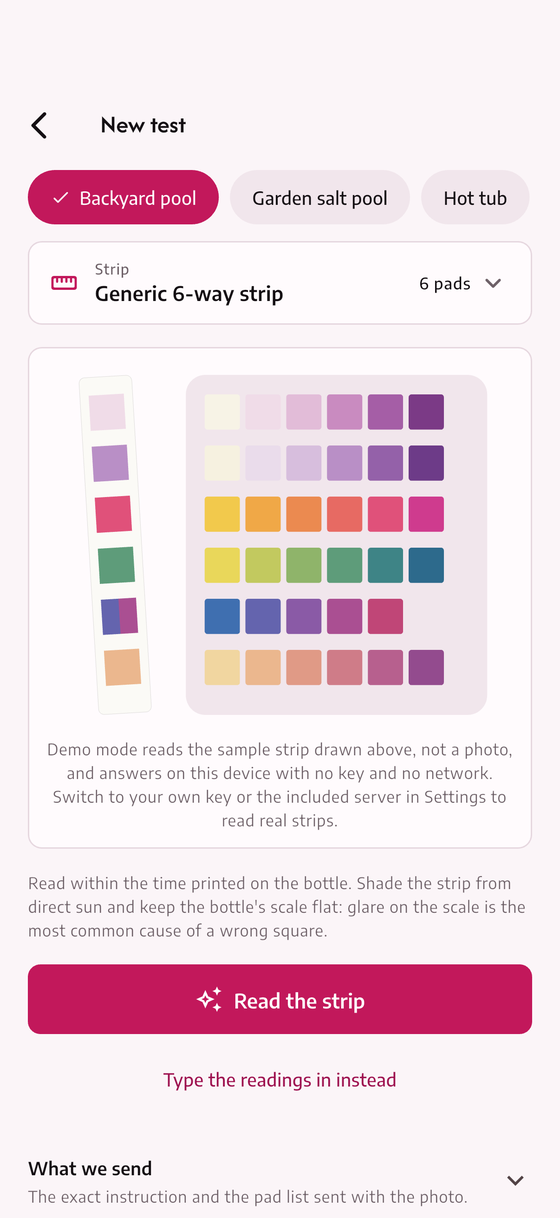
You land on Home in Demo mode. Tap Test water and then Read the strip: Demo mode "reads" the sample strip drawn in the frame and hands the answer to the same parser a live answer goes through, so you see the whole path, the pad ladder included, without a key.
Check it
flutter analyze     # expect: No issues found!
flutter test        # expect: All tests passed!  (143 tests)
Running it without a terminal
- Open the
rippora_ai_appfolder in Android Studio (File → Open) or VS Code with the Flutter extension. - Let the IDE run Pub get when it offers to (Android Studio shows a
banner at the top of
pubspec.yaml). - Pick a simulator or a connected phone in the device menu, and press the green Run button.
Everything this manual does with --dart-define on the command
line can also be done by editing one file; the chapter on pointing the app at
the back end shows how.
4Every screen, tab by tab
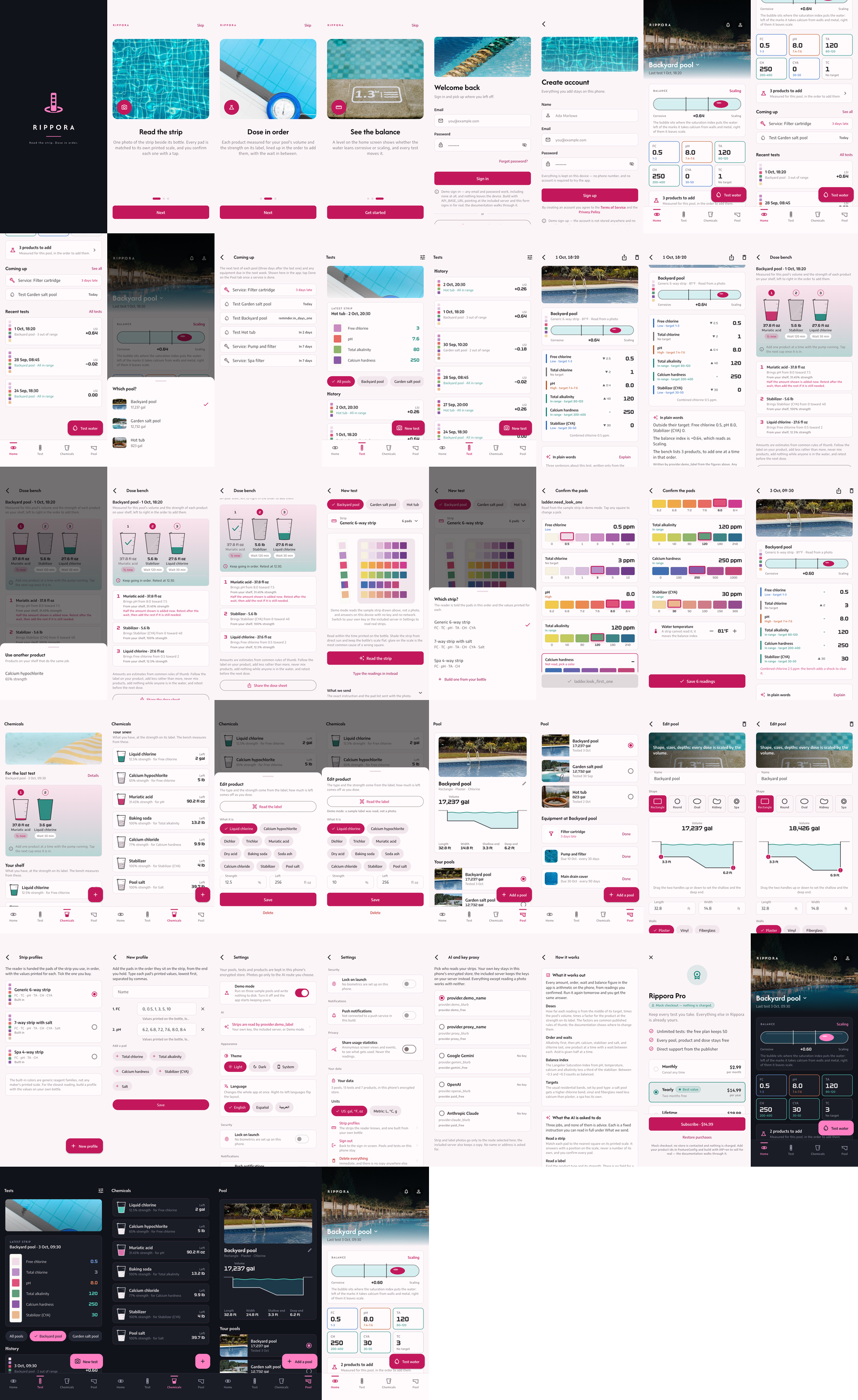
22 screens: four tabs, the screens they open, and Settings behind the avatar on Home. The pool switcher, the strip choice, the product editor and the product swap are bottom sheets on top of them.
| Where | Screen | What it is for |
|---|---|---|
| Entry | Splash, onboarding (three pages) | The strip mark; three photo pages that say what the app does. |
| Sign in, create account | A demo form, plus Google and Apple when configured. | |
| Home tab | Home | The pool in use, the level vial with the balance index, the six readings as tiles, what the bench asks for, what is coming up, the last tests. |
| Test tab | Tests | The latest strip drawn large, a filter per pool, and every test as a card with its pad colors down the edge. |
| Chemicals tab | Chemicals | The dose bench for the last test, and the shelf of products the bench measures from. |
| Pool tab | Pool | The pool in use as a side section with its volume, every pool and spa, and the equipment with its service dates. |
| A test | New test | Which pool, which strip, the photo (or the sample strip), and the What we send panel. |
| Confirm the pads | Every pad beside its printed scale, the reader's pick lifted, the water temperature, save. | |
| Test detail | Every reading against its target, the change since the last test, the balance index, three plain sentences on request. | |
| Dose bench | The cups in order, each step explained, the retest time, and the dose sheet to share. | |
| Pools and strips | Pool builder | Shape, sizes and the two depths dragged on a side section; the volume updates as you go. |
| Strip profiles, strip editor | The strips the reader knows, and one built from the numbers on a bottle. | |
| Coming up | The next test of each pool and the equipment due in the next week. | |
| Account | Settings | Demo mode, AI route, theme, language, lock, notifications, privacy, units, your data. |
| AI and key proxy | Which route reads strips: Demo mode, the included server, or a key of your own. | |
| How it works | About: what is computed, what the AI does, where data lives, what the app does not do. | |
| Rippora Pro | The in-app purchase screen (mock until you add store product ids). |
5Reading this manual: paths, units and callouts
- Paths are relative to the folder they belong to:
lib/…,test/…andassets/…are insiderippora_ai_app/;app/…,routes/…,config/…anddatabase/…are insidebackend/. - Anything in
<angle brackets>is a value you supply. The brackets are not part of it. file.dart:42means line 42 of that file, measured when this manual was built.- "Demo mode" means the sample household in
lib/app/data/mock/sample_data.dartand the on-device answer in theqh_aipack's demo route; "the back end" or "your server" meansbackend/. - Examples use US units (gallons, ounces, °F), the app's default. Everything is stored in metric and converted for display; Settings switches the display.
6Recoloring from one palette file
Every color in the app is in one file:
lib/app/core/theme/app_colors.dart. Light and dark values sit side
by side, so a token always has both. Light is the default theme.
The brand comes in grades
A store thumbnail has to be bright to stand out in a shelf of other thumbnails; white text needs a fill dark enough to be read. No single color does both, so the phenol pink is split, and each grade has one job:
| Constant | Value | Used for |
|---|---|---|
primaryBright | #FF7FC2 |
The store tile, the dark theme's buttons and highlights (dark ink on it), the selected square on the pad ladder. |
primary | #C2185B |
The light theme's fill: buttons, selected chips, the tab highlight. White on it. |
primaryDeep | #9E1250 |
Brand-colored words on the light paper. |
primaryDark / onPrimaryDark |
#FF7FC2 / #11131A |
The dark theme's fill and the ink on it. |
inRangeDark / inRangeLight |
#5EE6D2 / #0E7F72 |
Pool cyan, and it means one thing only: a reading inside its target. |
highDark / highLight, lowDark /
lowLight | four values | Above and below the target. |
Six parameters do not get six colors: a reading is in range, high or low, and those three are the only meanings a color carries. The pad squares on a strip card are the reagent colors themselves, from the strip profile, not theme colors.
Change a grade and keep its pair readable: a selected chip is the fill
color with its label on it, and test/theme_contrast_test.dart and
test/chip_contrast_test.dart fail if that pair drops below
4.5:1. The second one renders real chips and reads their pixels, so it catches
what reading the theme cannot.
7Typefaces
Three families, bundled as 7 files in
assets/fonts/ and never downloaded: Afacad
(600, 700) for headings and screen titles, Encode Sans (400,
500, 600) for the body, and Tektur (500, 600) for every reading
and every dose: ppm, pH, the balance index, ounces and grams.
- Drop your
.ttffiles intoassets/fonts/. Use static files: a variable font's file name carries square brackets, which a web build encodes and a marketplace upload rejects. - Update the
fonts:block inpubspec.yaml, one entry per weight. - Change the constants
headingFamily,bodyFamilyandfigureFamilyinlib/app/core/theme/app_text_theme.dart, the only Dart file that names a font. - Update
assets/fonts/LICENSES.txtso it names what you ship.
The Roboto entry in pubspec.yaml points at the body
face on purpose: anything Material draws from its own defaults falls back to
Roboto, and on the web the engine would otherwise fetch it from Google's font
servers.
8Regenerating the launcher icon from its script
The launcher icon is drawn by a script, so it can be regenerated after any change rather than hand-exported at twenty sizes.
Replacing it with your own artwork
- Make a 1024 × 1024 PNG, no transparency, no rounded corners: both stores round the corners themselves, and iOS rejects an icon with an alpha channel.
- For Android's adaptive icon, make a second 1024 × 1024 PNG of the mark alone on a transparent background, with the mark inside the middle 66% (the outer ring is cropped to a circle, a squircle or a teardrop depending on the phone).
- Save them as
assets/icon/app_icon.pngandassets/icon/app_icon_foreground.png, and setadaptive_icon_backgroundinpubspec.yamlto the color behind the mark (it ships as#FF7FC2). - Run
dart run flutter_launcher_icons. It writes everymipmap-*folder on Android and the wholeAppIcon.appiconseton iOS. - Uninstall the app from the simulator or phone and run it again: both platforms cache the old icon until the app is reinstalled.
Or edit the drawn one
Export your own mark as the two PNGs above (1024×1024, the foreground on a transparent ground with room for Android's circular mask) and
replace the browser icons in web/icons/ and web/favicon.png with the same mark at the sizes already there. The same geometry
is drawn in Dart by BrandMark in
lib/app/modules/splash/splash_view.dart, so change both
together.
9A new name and bundle id for your pool app
The name people see and the identifier the stores use are two different things, set in different places.
| What | Android | iOS |
|---|---|---|
| Name under the icon | android:label in
android/app/src/main/AndroidManifest.xml |
CFBundleDisplayName and CFBundleName in
ios/Runner/Info.plist |
| Bundle identifier | applicationId and namespace in
android/app/build.gradle.kts (now
com.rippora.rippora_ai_app) |
PRODUCT_BUNDLE_IDENTIFIER in
ios/Runner.xcodeproj/project.pbxproj: three Runner lines and
three RunnerTests lines (now com.rippora.ripporaAiApp). Easiest in
Xcode: Runner target → Signing & Capabilities → Bundle
Identifier. |
| Title in the task switcher | title: in lib/main.dart | |
On Android, if you change namespace, move
MainActivity.kt into the matching folder under
android/app/src/main/kotlin/ and change its
package line. iOS identifiers cannot contain underscores.
The strings a person reads (the wordmark on the splash, "Rippora Pro", the
lock prompt) are in the language files in lib/l10n/; search each
file for the old name.
10Swapping the pool photographs
The app ships 12 photographs in
assets/images/pool/: a pool lit at night for the Home hero, the
three sample pools (a backyard pool, a salt water pool, a hot tub), water, a
thermometer and a depth marker for onboarding and the screen banners, and the
pump and the main drain for the equipment list. They are royalty-free Pexels
stock, used under the Pexels License, and LICENSES.txt in the same
folder lists each one: file, subject, source page, photographer.
They are sample content. Replace them with your own: keep the file names and
nothing else needs to change, or change the names and update the references in
lib/app/data/mock/sample_data.dart and the screens. A pool a person
adds without a photo is drawn with a placeholder. Keep each file under about
150 KB and the long edge around 1280 px.
The test strip and its bottle chart in the capture screen's frame are not a
photograph: they are drawn from the strip profile and the sample's pad positions
(lib/app/core/widgets/sample_strip.dart), so they always show
exactly what Demo mode is about to read.
11The packs behind the switches
10 feature packs, in 12 small packages under
packages/: 10 interfaces and the two Firebase
implementations two of them plug into, each with a mock or no-op default
behind it. Nothing here runs until you switch it on,
which is why the app you just ran asked for no permission beyond the camera,
sent nothing anywhere and charged nobody. Every switch lives in one file:
lib/app/core/values/feature_config.dart. The single place that
chooses an implementation is
lib/app/data/services/feature_packs.dart; screens only ever see the
interface.
Languages (qh_l10n)
English, Spanish and Arabic ship. Every word the app shows comes from one
file per language in lib/l10n/. Settings → Language switches
the whole app at once; Arabic flips the layout. The app also sends the language
to your server (Accept-Language), so the back end's messages come
back in it.
| To… | Change |
|---|---|
| Add a language | Copy lib/l10n/es.dart to
<code>.dart, rename the constant, translate the values (the
date.* lines are month and weekday names). Add its import and its
name to the list in lib/l10n/app_languages.dart. |
| Remove a language | Delete its name and import from that list. |
| Change a sentence | Edit the value in en.dart and in
each other language file. The keys stay the same. |
test/l10n_test.dart fails when a language is missing a key or
still has English in it. Names the person types (a pool, a product label, a
strip profile) are kept as typed; everything the app writes is translated.
The Spanish and Arabic tables are machine-assisted. Have a native speaker read both before the app reaches real people.
AI routes (qh_ai)
The four routes to a model (Gemini, OpenAI and Claude with a person's own
key, and the included key proxy) and the on-device demo route, behind one
AiAdapter interface, plain REST with no vendor SDK. The jobs
themselves (what to ask, the reply shape, the parser) stay in the app under
lib/app/data/providers/. The chapter Picking an AI route: key, proxy or demo
covers keys, model names and the server.
Lock on launch (qh_biometric)
Settings → Security. The switch is disabled on a phone with no enrolled
biometrics. iOS shows the sentence in NSFaceIDUsageDescription
(ios/Runner/Info.plist); Android needs nothing further: the
manifest declares USE_BIOMETRIC and the activity is a
FlutterFragmentActivity.
Version prompts (qh_upgrade)
With API_BASE_URL set at build time, the app asks
GET /api/version once per launch. You drive it from the admin
panel's App updates page: each row is a release with the latest
version, the oldest version still allowed to run, the sentence the prompt shows,
the two store links and the time it goes live, and the newest published row is
the one the server answers with. Until a row is published, the server falls back
to APP_LATEST_VERSION, APP_MINIMUM_VERSION,
APP_UPDATE_MESSAGE and the two store URLs in its
.env. Below the minimum, the dialog has no Later
button.
Analytics and crash reports (qh_analytics + qh_analytics_firebase)
Needs a Firebase project. Run flutterfire configure, set
firebaseConfigured = true in lib/firebase_config.dart,
and enable Analytics and Crashlytics in the console. Settings → Privacy is
the consent switch; with it off nothing is collected, and test readings are
never sent either way. FeatureConfig.analyticsDefaultOn decides
where the switch starts. Demo mode never initializes Firebase, whatever the
flag says.
Without a terminal: in the Firebase console, add an Android
app and an iOS app with the bundle identifiers from the app name chapter,
download google-services.json and
GoogleService-Info.plist, put them in
android/app/ and ios/Runner/, and copy the API key,
app id, sender id and project id from them into the matching fields of
lib/firebase_options.dart by hand. Then flip the flag.
Push notifications (qh_push + qh_push_firebase)
The same Firebase project, plus the Push Notifications capability in Xcode
and an APNs key uploaded to the console. Permission is asked in Settings →
Notifications, never at launch. Every install subscribes to the topic in
FeatureConfig.pushBroadcastTopic (all), so the admin
panel's Send notification page, which needs
FIREBASE_CREDENTIALS in the back end's .env, reaches
all of them. A message with a route key opens that screen, for
example /reminders. Pick a time under Send later and
the server sends it then; Push history lists every send with its status
and cancels a scheduled one before it goes. For a send to everyone its
Phones column shows 1, because Firebase reports that it accepted the
message, not how many phones received it. A send
for later needs the scheduler's cron line (the chapter on putting the back end on
a server).
Continue with Google / Apple (qh_social_login)
Outside Demo mode the buttons appear only for the providers you configure, and
with API_BASE_URL set the id token is exchanged at
POST /api/auth/social. Every console step, for both providers on
both platforms, is in the chapter Setting up Google and Apple sign-in.
In-app purchases (qh_iap)
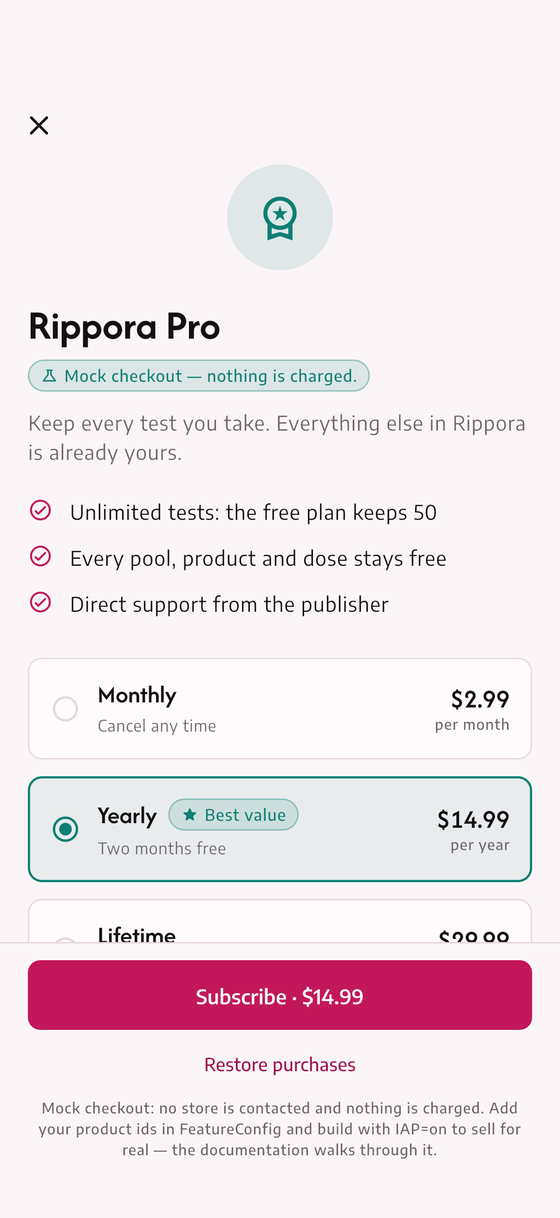
The Rippora Pro screen sells one digital unlock: an unlimited test history
(the free plan keeps 50 tests). Its product ids
go in FeatureConfig.iapProductIds, keyed by plan id
(monthly, yearly, lifetime). Until you
build with --dart-define=IAP=on the screen is a mock: instant,
always succeeds, charges nothing, and says so on the screen. The store steps are
in the chapter Setting up in-app purchases.
Pictures (qh_image)
QhNetworkImage shows a picture from an https:// URL
or a bundled asset://assets/images/… file, with a placeholder while
loading and a neutral box if the URL is dead. The sample pools' photos are
bundled assets; use the pack when your pools or products come from a server.
Sharing (qh_share)
The share icon on a test hands its readings (each with where it sits, and the balance index) to the system sheet as text, and Share the dose sheet on the bench does the same for the steps. On iPad the sheet is anchored to the button that was tapped.
Switching packs on connects the app to third-party services (Firebase, Google Cloud, the Apple and Google developer programs and their stores), which will involve accounts of your own and will incur their own separate costs, billed by those providers to you. None of them is included in this item.
12Setting up in-app purchases
The paywall and the qh_iap pack are finished; what is left is on the
stores' side. Until you do the steps below the app runs a mock checkout:
every purchase succeeds instantly, charges nothing and says so on screen, which is what
the walkthrough and the Live Preview show. Do the store you ship to first; each takes
about an hour, most of it waiting for the store.
| What the app already does | Where |
|---|---|
| Reads prices from the store, in the buyer's currency | SubscriptionService · StorePurchaseGateway |
| Keeps Pro after a purchase, offline too | the encrypted store on the phone |
| Restore purchases (one tap on the paywall) | PurchaseGateway.restore() |
| Android's billing permission | android.permission.BILLING is already in AndroidManifest.xml |
| Verifies each purchase with your own server | left to you: the verify hook on StorePurchaseGateway |
1. Put the product ids in one file
Pick one id per plan and use the same id in both stores. The keys are the plan ids the paywall already shows; the values are what you create in the stores:
// lib/app/core/values/feature_config.dart
static const iapProductIds = <String, String>{
  'monthly': 'com.rippora.ripporaAiApp.pro.monthly',
  'yearly': 'com.rippora.ripporaAiApp.pro.yearly',
  'lifetime': 'com.rippora.ripporaAiApp.pro.lifetime',
};
Store ids cannot be reused after you delete them, so settle on the names first.
2. App Store Connect (iOS)
- Agreements, Tax, and Banking → accept the Paid Apps agreement and fill in tax and bank details. Until its status is Active, the store returns no products at all. That is the most common reason a paywall shows the mock prices on a real phone.
- Apps → + → New App with bundle id
com.rippora.ripporaAiApp(it must match Xcode exactly). - In the app: Monetization → Subscriptions → create a subscription group (for example Rippora Pro), then one subscription per recurring plan with the ids from step 1. A one-off plan (lifetime) goes under In-App Purchases as Non-Consumable.
- Give each product a price, a display name and a review screenshot (the paywall screen is fine). Products stay Missing Metadata, and invisible to the app, until all three are there.
- Users and Access → Sandbox → Test Accounts → add a tester with an e-mail that is not a real Apple ID.
- In Xcode open
ios/Runner.xcworkspace→ Runner → Signing & Capabilities → + Capability → In-App Purchase. (It adds no file to the project; the capability lives on the App ID.)
3. Play Console (Android)
- Create app, then complete the payments profile (Settings → Payments profile); without it, products cannot be created.
- Upload one signed build (
flutter build appbundle) to Testing → Internal testing. Google only serves products to an app it has seen; with no build uploaded, every product answers not found. - Monetize → Products → Subscriptions → one subscription per recurring plan with the ids from step 1, each with a base plan and a price. A one-off plan goes under In-app products. Activate each one.
- Settings → License testing → add the Google accounts that will test; they are charged nothing and can cancel at once.
- Join the internal test from that account (the opt-in link on the Internal testing page)
and install from the Play Store once. A build side-loaded with
flutter runworks afterwards, a build that was never installed from Play may not see products.
4. Turn it on and try it
flutter run --release --dart-define=IAP=on
# a real phone, signed in with the sandbox (iOS) or license-test (Android) account
The paywall now shows the store's prices. Buy a plan: the sheet is the store's own,
marked as a test. Then delete and reinstall the app and tap Restore purchases: Pro
comes back. Leave out --dart-define=IAP=on and the app goes back to the mock, which
is why simulator runs and the Live Preview never touch a store.
When products do not load
| What you see | Why | Fix |
|---|---|---|
| Mock prices on a real phone | Built without --dart-define=IAP=on, or iapProductIds is empty | Step 1 and step 4 |
| iOS: the paywall lists no plans | Paid Apps agreement not active, or a product still Missing Metadata | App Store Connect step 1 and 4 |
| iOS: Cannot connect to iTunes Store | Signed in with a real Apple ID on a debug build | Sign out under Settings → App Store → Sandbox Account and use the tester |
Android: item not found / BILLING_UNAVAILABLE | No build on a testing track, the product is inactive, or the Play Store app is not signed in | Play Console step 2 and 3 |
| Android: This version of the application is not configured for billing | The running build's version code is higher than any uploaded one | Upload the build you are running to internal testing |
The app trusts the store's answer on the phone. For anything you would not want a
modified phone to unlock, verify each purchase on a server: App Store Server API and Google Play
Developer API both take the purchase token the verify hook receives. The stores
keep their standard commission on every sale.
13Setting up Google and Apple sign-in
The buttons and the sign-in flow are finished: the app sends the id token to the included back end (POST /api/auth/social), which checks it with Google or Apple and answers with the same session a password sign-in gets. What is left is registering the
app with Google and Apple. A button appears only for a provider you configure, so you can ship with one
and add the other later, with one rule on iOS: App Store guideline 4.8 says an app that offers Google
sign-in must also offer Sign in with Apple, so on iOS the Google button stays hidden until Apple is set up
too (a debug build says so in the console). Android shows whatever you configure. In demo mode both buttons show and sign in as a demo user without
asking anything.
Field in lib/app/core/values/feature_config.dart | What goes in it |
|---|---|
googleServerClientId | The Web OAuth client id. It is what makes the id token checkable by a server. Needed on Android and iOS. |
googleIosClientId | The iOS OAuth client id. |
appleSignIn | true once the capability is on the App ID (step "Apple on iOS"). A button without it fails every time. |
appleServiceId · appleRedirectUri | Only for Apple on Android: the Services ID and its Return URL. |
Your identifiers: iOS bundle id com.rippora.ripporaAiApp · Android package com.rippora.rippora_ai_app.
Google on Android
- In Google Cloud console → APIs & Services → Credentials (the project you use for the app), configure the OAuth consent screen first: app name, support e-mail, and your domain if you have one.
- Create credentials → OAuth client ID → Web application. Copy its client id into
googleServerClientId. - Create credentials → OAuth client ID → Android, package name
com.rippora.rippora_ai_app, and the SHA-1 of the key that signs the build. Add one per key: the debug key for development, your upload key, and the App signing key Play shows under Setup → App integrity for store installs:# debug key keytool -list -v -keystore ~/.android/debug.keystore \ -alias androiddebugkey -storepass android -keypass android # release (upload) key keytool -list -v -keystore <your upload keystore>.jks -alias <its alias> - On the server, put the same Web client id in
GOOGLE_CLIENT_IDSinbackend/.env(comma-separated if you have several). The server only accepts id tokens made for the ids listed there.
Google on iOS
- Create credentials → OAuth client ID → iOS, bundle id
com.rippora.ripporaAiApp. Copy its client id intogoogleIosClientId. - Add the reversed iOS client id as a URL scheme, so Google can hand the result back
to the app. It goes in
ios/Runner/Info.plist, inside the top-level<dict>:<key>CFBundleURLTypes</key> <array> <dict> <key>CFBundleURLSchemes</key> <array> <!-- the iOS client id, reversed: com.googleusercontent.apps.1234-abcd --> <string>com.googleusercontent.apps.REPLACE_WITH_YOURS</string> </array> </dict> </array>
Apple on iOS
- In the Apple Developer portal → Certificates, Identifiers & Profiles →
Identifiers, open the App ID
com.rippora.ripporaAiAppand tick Sign in with Apple. - The entitlement is already in
ios/Runner/Runner.entitlements; Xcode shows it under Signing & Capabilities. Regenerate the provisioning profile if Xcode asks. - Set
appleSignIn = true. - On the server, list who Apple tokens may be for in
APPLE_CLIENT_IDS: the iOS bundle idcom.rippora.ripporaAiApp, and the Services ID if you also sign in on Android.
App Review (guideline 4.8) asks an iOS app that offers Google sign-in to offer a privacy-focused option as well; Sign in with Apple is the one it names, so ship the two together on iOS.
Apple on Android
Optional: most apps offer Apple on iOS only. On Android it runs in the browser and comes back
to the app through the activity already declared in AndroidManifest.xml
(SignInWithAppleCallback).
- Identifiers → + → Services IDs: create one (for example
com.rippora.ripporaAiApp.signin), enable Sign in with Apple, and add your domain and the Return URL below. - Keys → +: a key with Sign in with Apple enabled, for the App ID; download the
.p8file (once only). - The trip back into the app goes through the included back end, so the Services ID's
Return URL is
https://<your server>/api/auth/apple/callback. SetAPPLE_ANDROID_PACKAGE=com.rippora.rippora_ai_appinbackend/.envso it knows which app to hand the result to, and add the Services ID toAPPLE_CLIENT_IDS. - Put the Services ID in
appleServiceIdand the Return URL inappleRedirectUri.
Try it
Build with the ids filled in and demo mode off, on a real phone for Apple (the simulator cannot sign in with Apple reliably). Sign in with each provider once, sign out, and sign in again: the second time Apple sends no name or e-mail. That is Apple's normal behavior, and the account is found by its id.
Staying signed in
Someone who signs in stays signed in: closing the app, or the phone killing it, does not sign them out. The next time it opens it goes straight to the main screen, without the slides or the sign-in form. Only Sign out or Delete account ends the session.
A Google / Apple sign-in on the included back end also keeps its session token in the same store, so requests after a restart carry it as before.
The session is one entry in the phone's encrypted store (Keychain on iOS, Keystore on Android),
kept by lib/app/core/session/session_memory.dart. It is written when a sign-in finishes, and a
sign-up still waiting on the code screen does not count. The splash reads it once. Two cases never
remember a session: the web build running on the sample data, which is the Live Preview, so every visitor
sees sign-in; and a session made on the sample data, which a build talking to a server will not
accept.
Deleting an account
Apple (App Store guideline 5.1.1(v)) and Google Play both require that an app which lets people make an account also lets them delete it from inside the app. This one does.
Settings → Delete account does two calls on the included back end:
DELETE /api/auth/me for a Google or Apple sign-in (the account and its tokens), then
DELETE /api/ai/device for this phone's device record, its request log and every strip
photo stored under it. The device key is forgotten too, so a later AI read registers as a new device.
Pools and tests on the phone stay until Delete everything.
Google Play also asks, in the Data safety form, for a web page where people can ask for deletion without the app. A page with your support e-mail address is enough.
Terms of Service and Privacy Policy
Both stores ask for a privacy policy (App Store Connect and the Play Console each have a field for its address), and people should see what they agree to before they make an account. The sign-up screen says By creating an account you agree to the Terms of Service and the Privacy Policy with both names tappable, and Settings has a row for each.
- Rewrite
assets/legal/terms.mdandassets/legal/privacy.mdas your own: they are templates, with every part to fill in shown in [square brackets], and a list of what this app keeps and sends that you should check against how you run it. - Publish them as web pages and put the two addresses in
termsUrlandprivacyUrlinlib/app/core/values/feature_config.dart. From then on both entries open the page in the browser, the same page the store listing links to. Left empty, the bundled text shows inside the app.
When sign-in fails
| What you see | Why | Fix |
|---|---|---|
| No Google button | googleServerClientId is empty (and demo mode is off) | Google on Android, step 2 |
| iOS only: no Google button, though Android has one | Sign in with Apple is not set up; App Store guideline 4.8 needs both | Apple on iOS, then appleSignIn = true |
| Android: DEVELOPER_ERROR / error 10 | The SHA-1 of the key that signed this build is not on an Android OAuth client | Add that SHA-1. Play-installed builds use the App signing key |
| iOS: the app crashes when Google opens | The reversed client id URL scheme is missing | Google on iOS, step 2 |
| Apple: invalid_client | The Services ID, domain or Return URL does not match what the portal has | Apple on Android, step 1 |
| The server answers 503 sign-in is not configured | GOOGLE_CLIENT_IDS / APPLE_CLIENT_IDS are empty | Fill them in backend/.env |
14The two themes
Light is the default: soft pink paper that stays readable at the pool's edge in daylight, where strips are read. Dark is a real second theme, a night-pool blue-black ground with the phenol pink on top, not an afterthought.
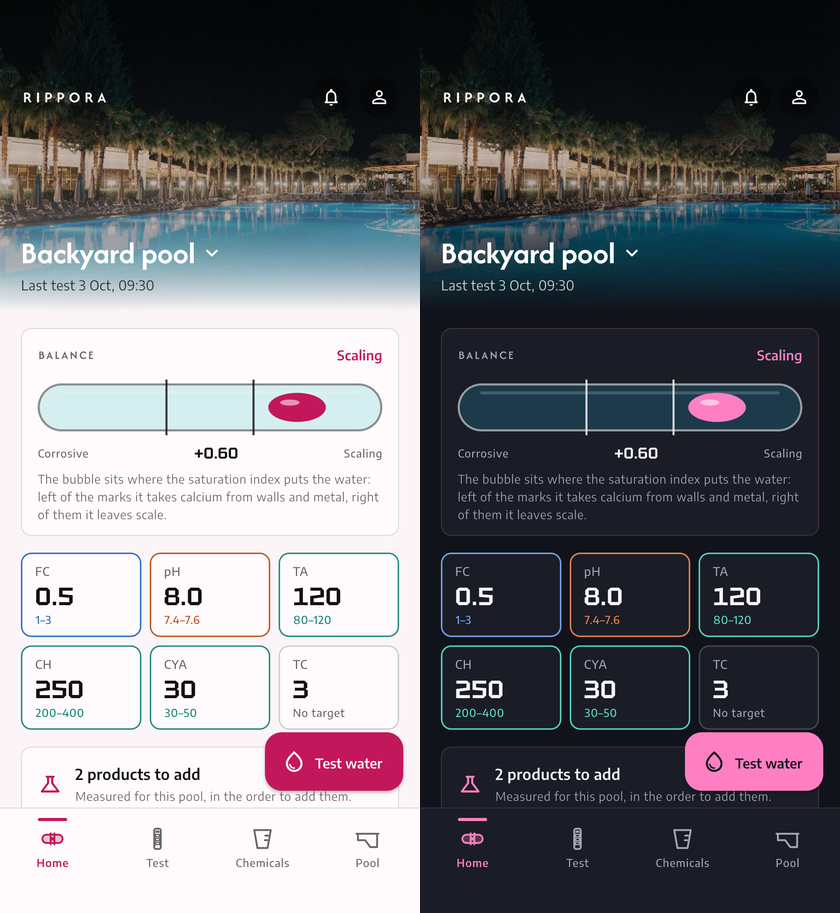
Settings → Appearance switches between light, dark and the phone's
setting. To open in light by default, change the one line in
lib/app/core/theme/theme_controller.dart:
final choice = ThemeChoice.dark.obs; →
ThemeChoice.light.
15Home, Test, Chemicals, Pools: editing the tab bar
Four tabs on a bar drawn by the app itself (_BottomBar in
lib/app/modules/main/main_view.dart), mounted as the scaffold's
bottomNavigationBar.

lib/app/core/widgets/tab_glyphs.dart): a level vial, a test strip,
a measuring cup and a pool section, so they recolor with the theme.Adding a tab
- Build the screen in its own folder under
lib/app/modules/, as the other tabs are. lib/app/modules/main/main_controller.dart: add a constant toMainTabwith the next index.lib/app/modules/main/main_view.dart: add the view to theIndexedStackchildren at the same index, add its id to_tabIds, and add anavItemto the bar's row. Add an icon toTabGlyphor use a Material icon.- If the screen has a controller,
lazyPutit inlib/app/modules/main/main_binding.dart. - Add the label to every file in
lib/l10n/('tab.<name>').
Removing a tab
The same places, in reverse, and renumber the MainTab constants
that come after it. The index in MainTab, the position in the
IndexedStack and the position in the bar must agree, or a tap opens
the neighboring screen; and test/app_smoke_test.dart and
integration_test/screenshots_test.dart tap tabs by their key
(tab-Test, tab-Chemicals…), so update them in the same
change.
Five tabs fit on a phone; past that, move one behind the avatar on Home as Settings is.
16Targets and dose factors
Two tables decide every dose, and both are short Dart files you can read in a minute.
Targets
The band each reading should sit in, per pool type, starts at lib/app/data/engines/targets.dart:10:
| Reading | Pool | Salt pool | Spa |
|---|---|---|---|
| Free chlorine | 1–3 ppm | 3–5 ppm | 3–5 ppm |
| pH | 7.4–7.6 | 7.4–7.6 | 7.4–7.6 |
| Total alkalinity | 80–120 ppm | 60–80 ppm | 80–120 ppm |
| Calcium hardness | 200–400 plaster, 175–250 vinyl or fiberglass | same | 150–250 ppm |
| Stabilizer (CYA) | 30–50 ppm | 60–80 ppm | 0–30 ppm |
| Salt | none | 2,700–3,400 ppm | none |
Total chlorine has no band of its own: what matters is how far it sits above free chlorine (combined chlorine). Over 0.5 ppm, the bench adds a shock of ten times the combined chlorine.
Dose factors
Each product type carries the amount that moves its reading by one step in
10,000 US gallons at a reference strength, starting at lib/app/data/models/chemical.dart:11. They are the
common published rules of thumb, and they are estimates: the label on the
person's product is what counts. To change one, edit its
perStep (and refStrength if you quote it at another
strength) and run flutter test: test/engines_test.dart
pins the worked example in the chapter on the dose bench, so it will tell you
what moved.
Have someone who services pools in your market read both tables. Local practice differs (some markets run lower stabilizer, some quote calcium as calcium carbonate), and these values are a starting point, not a standard.
17Strip profiles
A strip profile tells the reader which pads a strip has, in which order, and
the values printed beside each pad on the bottle. Three ship built in
(lib/app/data/engines/strip_catalog.dart:49): a generic 6-way strip (free and total chlorine, pH, alkalinity,
calcium, stabilizer), a 7-way strip that adds salt, and a 4-way spa strip. A spa
starts on the spa strip and a salt pool on the 7-way; anything else starts on the
profile ticked under Strip profiles.
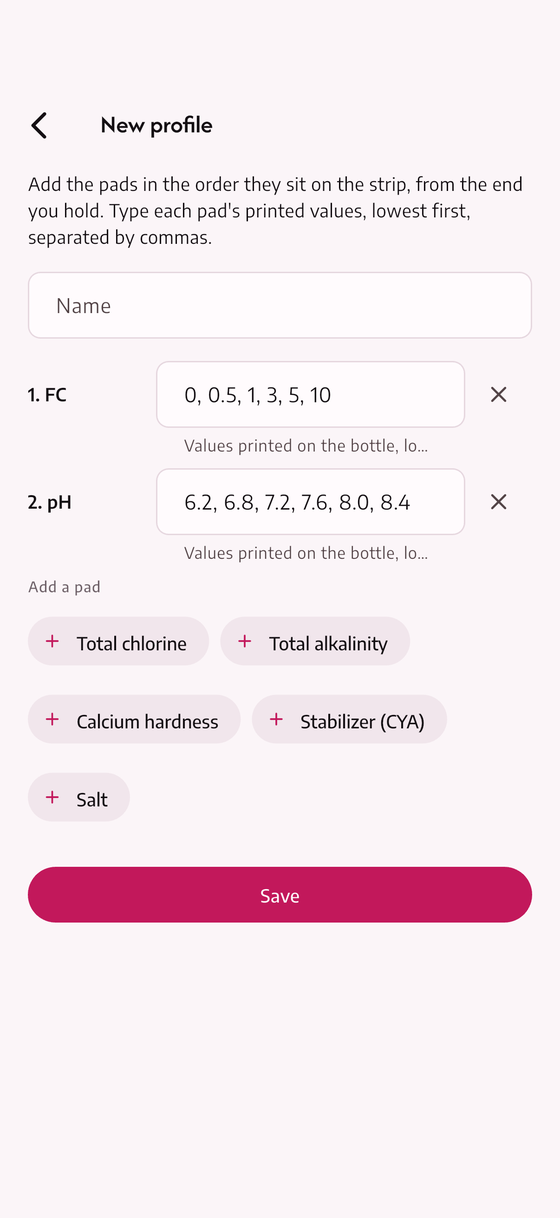
The built-in colors are generic reagent families (chlorine pads run from white to violet, pH from yellow through orange to the phenol pink), not any maker's printed values. For the closest reading, a person builds a profile from their own bottle: Test tab → the slider icon → New profile, then add the pads in the order they sit on the strip and type each pad's printed values. The colors of a profile built this way are spread from the built-in family for that pad, so the ladder still shows a usable scale; the values are the person's own.
18Architecture
GetX, in four layers, and each layer only talks to the one below it:
View  (lib/app/modules/…)           what the person sees
  └ Controller                        screen state, taps
      └ PoolService / AiService       every derived figure / every AI request
          ├ engines (data/engines/)   pure Dart: targets, balance, dose, trend
          ├ jobs    (data/providers/) strip read, label read, three sentences
└ LocalStore ×5, settings encrypted storage on the phone- No screen imports the sample data. Everything goes through
PoolService, which reads fiveLocalStores (pools, tests, the shelf, equipment, strip profiles), wired inlib/main.dart. While Demo mode is on they hold the sample household in memory and write nothing to disk; switching Demo mode off is the moment the app starts keeping the person's own. Delete everything also deletes every strip and label photo the app has written, and deleting one test deletes its photo, on the phone. A copy already kept on the included server stays there. - The engines are pure Dart
(
lib/app/data/engines/): no Flutter import, no clock of their own, no network. Every input is a parameter, which is why they are tested line by line and why you can lift them into another app. - One service talks to the AI:
AiServicepicks the adapter for the route chosen in Settings (Demo, Gemini, OpenAI, Claude or your server) from theqh_aipack, runs a job through it, and hands the reply to the job's own parser. Screens never see a provider. - Storage is the platform's encrypted store: the Keychain on
iOS, EncryptedSharedPreferences on Android. A strip or label photo is a file in
the app's own documents folder, and a test keeps only the file's name, never the
device path, so an app update that moves that folder still finds it. While the
app reads strips through the included server, the server keeps a copy of each
photo too (see Picking an AI route: key, proxy or demo). API keys never leave
SettingsServiceas a list. - Everything drawn is drawn: the level vial, the measuring cups, the pool section with its depth handles, the strip cards' pad columns, the sample strip and its chart, and the tab icons are 7 custom painters, not image assets.
19Reading a strip: where the AI stops
Three jobs go to a model, and each one is fenced in the same three places: the instruction says what is allowed, the reply schema has nowhere to put anything else, and a parser in the app reads only the fields it knows and checks every value.
| Job | Sees | Returns |
|---|---|---|
StripReadJob | One photo of a strip beside its bottle, and the strip profile's pad list | For each pad (up to 8), the position of the nearest printed square on its scale, or nothing, with a confidence; and at most one short note about glare or a wet bottle. |
LabelReadJob | One photo of a product label | The product type (from a fixed list) and its strength in percent. |
ExplainWaterJob | Numbers only, never a photo | Three short sentences about the test. |
A position, not a number
The rules for reading a strip start at lib/app/data/providers/strip_read_job.dart:38. The model is handed the pad
list with the values printed on the bottle and asked, pad by pad, which printed
square is nearest. It never returns a reading of its own, never estimates
between two squares, never advises and never says whether the water is safe. The
reply schema at lib/app/data/providers/strip_read_job.dart:89 has an index field and no
value field, so a model that wanted to invent a pH of 7.35 has
nowhere to put it.
The parser keeps only what exists
static StripReading parse(Map<String, dynamic> json, StripProfile profile) // lib/app/data/providers/strip_read_job.dart:119- A pad the profile does not have is dropped; a pad named twice is read once.
- An index that is not on that pad's scale is refused, and the pad is marked
for a look rather than guessed at.
"2"and2.0are read as 2. - Every pad of the profile comes back, read or not, so the ladder always has a full row per pad.
- A reply whose fields have the wrong type becomes the named bad response error, never a silent stop.
Nothing the reader returns is saved as it is. The pad ladder (next chapter but one) puts every pick in front of the person first.
What we send
The What we send panel on the capture screen opens to the exact instruction the model gets, rules and pad list included. On the included server it also shows the schema instruction that route adds, because the server has nowhere to hang a structured-output schema (see the chapter on AI routes). What is sent is the instruction, the pad list and the photo; nothing else about the person or the pool goes with a read. On the included server route the photo file is also stored on that server afterwards (see Picking an AI route: key, proxy or demo).
The label reader
On the Chemicals tab, a product's sheet has Read the label: one photo of the label returns the product type and its strength, which fill the two fields for the person to check. The schema has no field for a brand, a product name, a price or a shop.
The third job only sees numbers
ExplainWaterJob is given each reading with its target and where
it sits, the balance index and how many products the bench lists, each already
formatted the way the screen prints it. Its parser drops any sentence that
carries a number not in that list, so a sentence cannot state a figure the
screen does not show.
20Targets, LSI, dosing and trends: the engines
| Engine | Answers | Tests |
|---|---|---|
Targets | The band each reading should sit in, for a pool, a salt pool or a spa, and on plaster, vinyl or fiberglass (the chapter on targets and dose factors has the table). | test/engines_test.dart,
test/pool_service_test.dart |
LsiEngine | The Langelier Saturation Index from pH, temperature, calcium, alkalinity and stabilizer, and whether that is corrosive, balanced or scaling. | |
DoseEngine | What to add, how much, in which order and how long to wait, for one pool, one confirmed test and the products on the shelf. | |
TrendEngine | The test before this one for the same pool, and the change in every reading since. |
The balance index, worked
The backyard pool's test on 1 October: pH 8.0, alkalinity 120 ppm, calcium 250 ppm, stabilizer 0, water at 27 °C (81 °F).
| Term | How | Value |
|---|---|---|
| pH | as read | 8.00 |
| Temperature factor | table, 24 °C 0.6 to 29 °C 0.7, interpolated | 0.66 |
| Calcium factor | log10(250) − 0.4 | 2.00 |
| Alkalinity factor | log10(120 − 0 / 3) | 2.08 |
| Constant | 12.1 (12.2 above 1,000 ppm dissolved solids, a salt pool) | −12.10 |
| Balance index | +0.64 |
Between −0.3 and +0.3 counts as balanced; +0.64 leans to scaling, which
is where the bubble sits on Home. test/engines_test.dart asserts
this value.
Rules worth knowing before you change them
- The order is fixed: alkalinity, pH, calcium, stabilizer, salt, and chlorine last, the order public pool-care guidance gives. Raising alkalinity with baking soda also lifts pH, so the bench does not add soda ash in the same round; it says to retest.
- Acid is given half at a time. An acid step shows half the computed amount, with a note to retest and add the rest if it is still needed. Acid for high alkalinity is not offered while pH is already low. With pH low and alkalinity high, everything that lifts pH lifts alkalinity too, so the bench shows an Aerate instead card rather than a cup.
- Some readings only come down with fresh water. Too much calcium, stabilizer or salt becomes a replace water step with the share to drain and refill.
- The shelf decides the product. For each job the bench uses the first product on the shelf that does it (one with stock left first), at the strength on its label. Long-press a cup to pick another. With nothing suitable on the shelf it measures the reference product and says so.
21The pad ladder
After a read, every pad of the strip is a row: its name, the value of the picked square in the reading face, and the bottle's printed squares in a row under it, lowest on the left. The square the reader picked is lifted with a pink outline. Tap any other square and that is the reading.
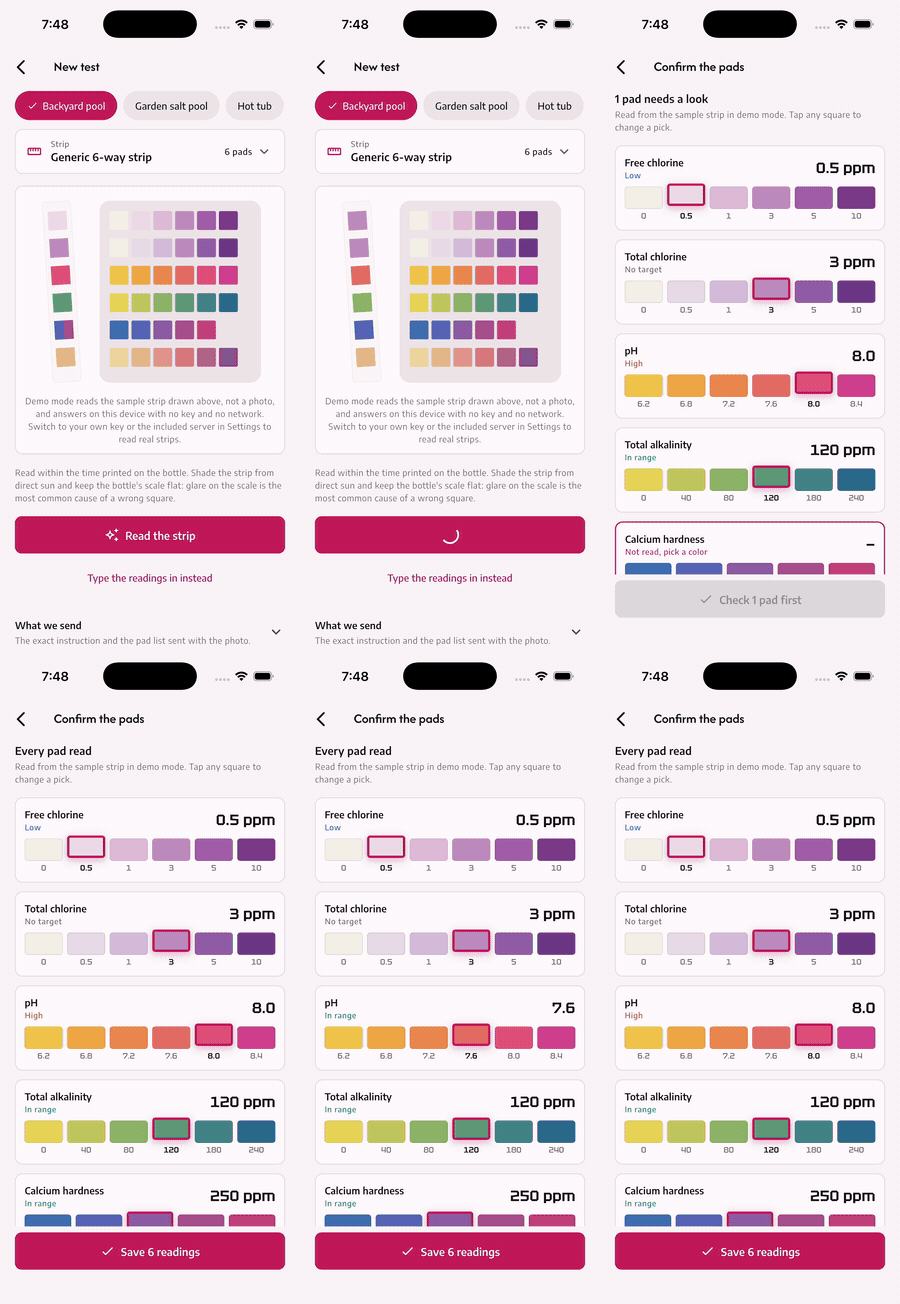
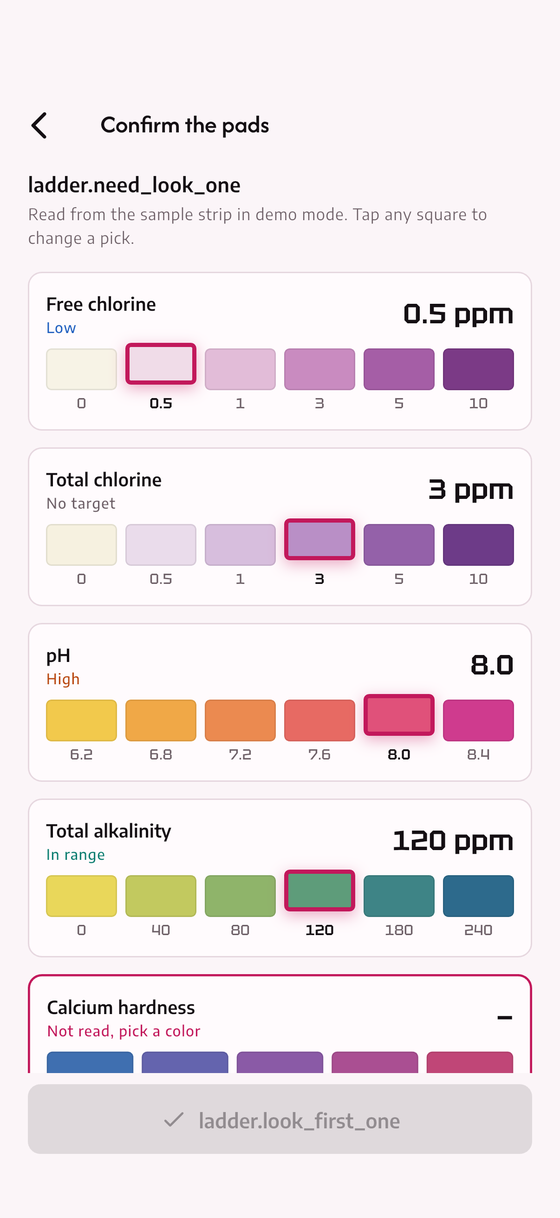
- A pad the reader was unsure of, or could not read, is outlined in pink and holds the save button until the person has looked. Looks right keeps the reader's pick; tapping a square picks another.
- Discrete squares, never a slider: a strip can only ever read one of the values printed on its bottle, so the control offers exactly those.
- Typing it in (Type the readings in instead, on the capture screen) opens the same ladder with nothing picked and every pad to look at.
- The water temperature is a stepper under the pads, starting from the last test of that pool. A strip cannot read it, and the balance index needs it.
Saving makes the test, with the photo's file name, and opens it. The free
plan keeps the number of tests set in SubscriptionService; the
next save past it opens the Pro screen.
22The dose bench
The bench is a row of measuring cups, left to right in the order to add them. Each cup is filled to its dose relative to the largest dose on the same bench, with the amount, the product and a chip under it: the wait before the next product, or ½ now for acid. A liquid is drawn as a flat surface, a powder as a heap.
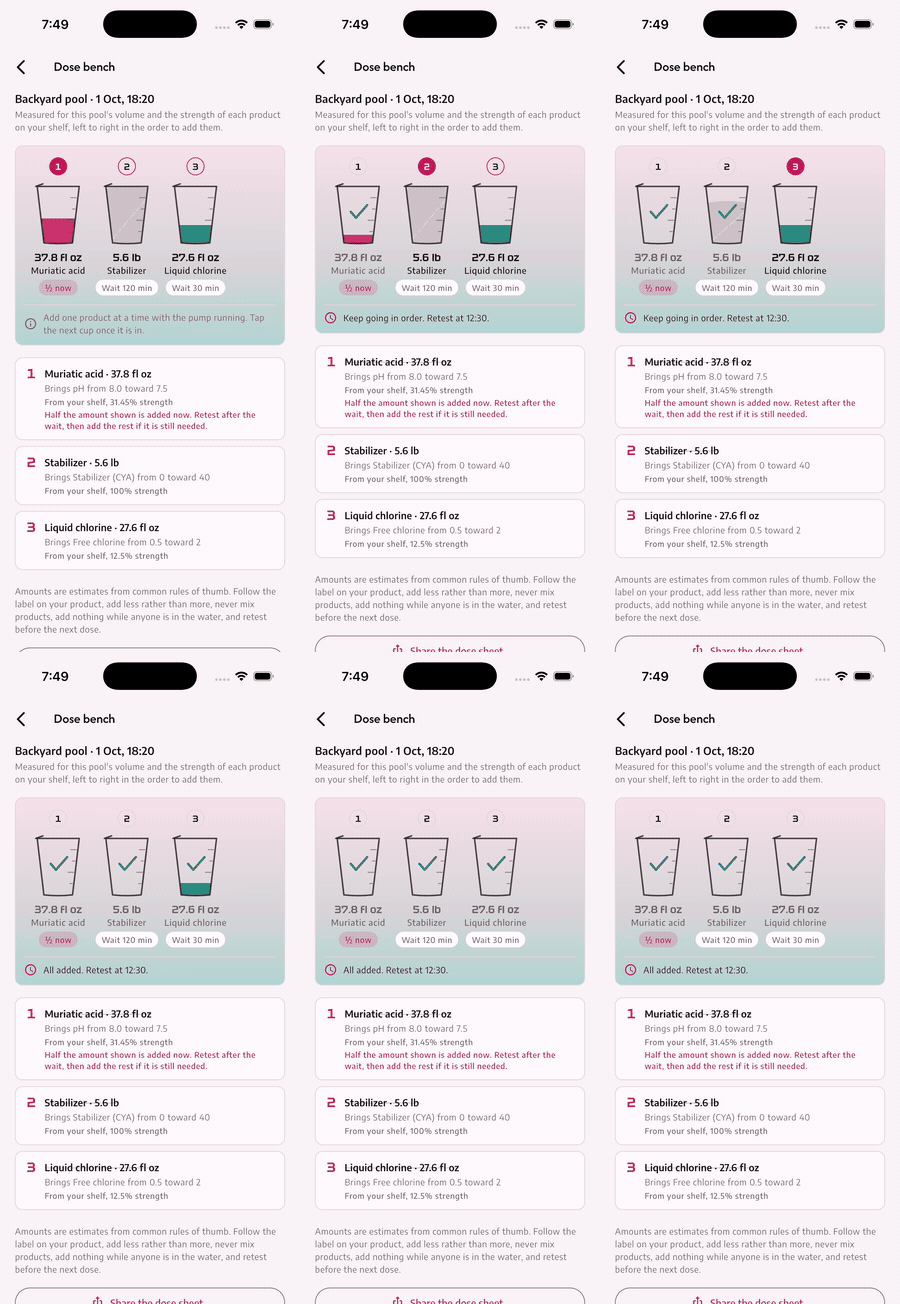
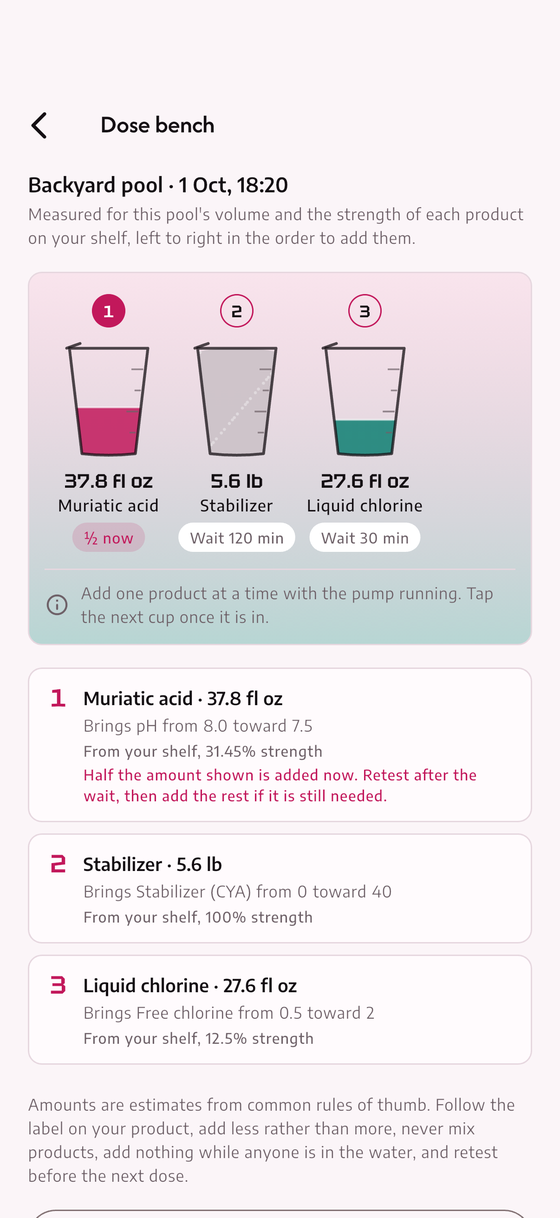
- Only the next cup can be marked added. Marking it empties the cup, takes the amount off that product's stock on the shelf and starts the bench clock. The footer then gives the time to retest: the time of the first cup plus every wait.
- Long-press a cup to use another product on the shelf for the same job. The choice holds for the session.
- Each step explains itself under the cups: what it moves from where to where, whether the product is from the shelf (at its strength) or not on it (at the reference strength), and the half-dose note for acid.
- Share the dose sheet sends the steps as text through the system sheet.
The dose, worked
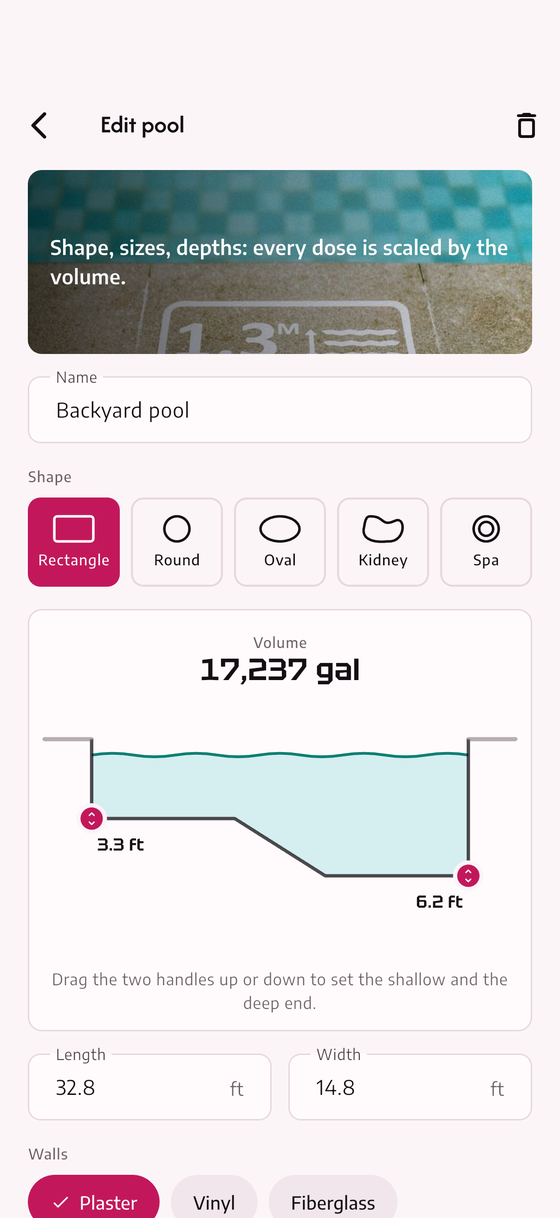
The backyard pool is a 10 × 4.5 m rectangle, 1.0 m at the shallow end and 1.9 m at the deep end: 45 m² × 1.45 m average depth = 65,250 L, or 17,237 US gallons (1.724 × 10,000).
| Step | Reading | How | Amount |
|---|---|---|---|
| 1. Muriatic acid 31.45% | pH 8.0 to 7.5 | 216 ml per 0.1 pH per 10,000 gal at alkalinity 100, × 5 × 1.724 × 120/100, then half | 1,117 ml (37.8 fl oz) |
| 2. Stabilizer 100% | CYA 0 to 40 | 369 g per 10 ppm per 10,000 gal, × 4 × 1.724 | 2,544 g (5.6 lb) |
| 3. Liquid chlorine 12.5% | FC 0.5 to 2 | 316 ml per 1 ppm per 10,000 gal, × 1.5 × 1.724 | 817 ml (27.6 fl oz) |
Alkalinity (120) and calcium (250) are already inside their bands, so they add nothing. The waits are 30, 120 and 30 minutes, so the retest is three hours after the first cup.
The bench measures; it does not judge. The amounts are estimates from common rules of thumb, and the screen says so: follow the product label, add less rather than more, never mix products, add nothing while anyone is in the water, and retest before the next dose. The app never says the water is safe to swim in.
23The level vial
Home opens on a spirit level: a glass tube with two marks in the middle and a bubble that sits where the balance index puts the water. Left of the marks the water is corrosive (it takes calcium from plaster, grout and metal), right of them it is scaling (it drops calcium as crust), and between them, from −0.3 to +0.3, it is balanced. The tube spans −1 to +1; anything further out presses against the end. The bubble turns pool cyan when it is between the marks.
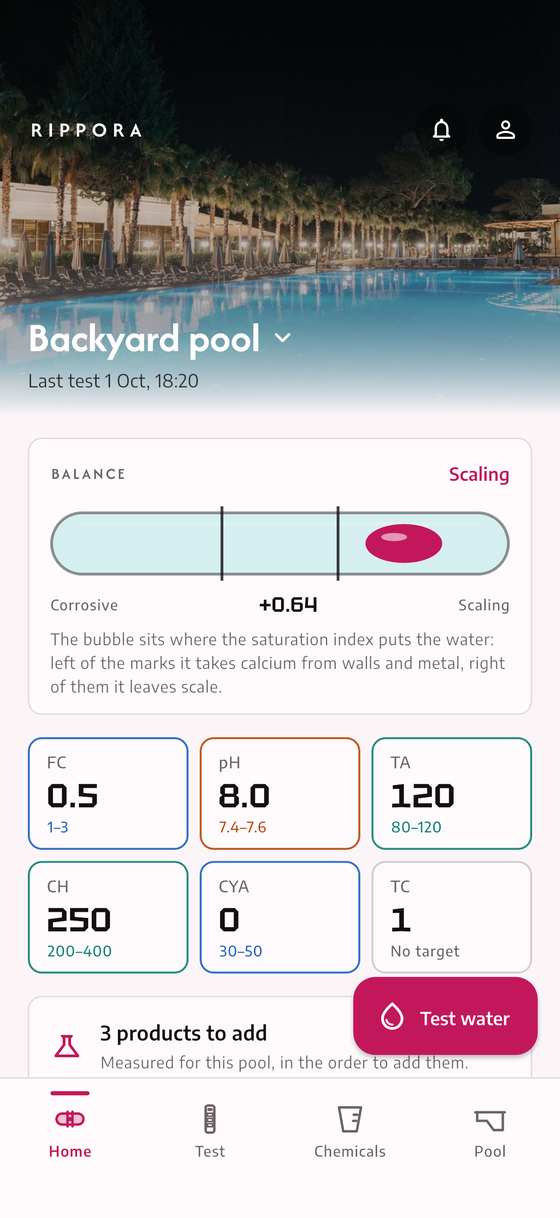
Under the vial, six tiles hold the last test's readings with their target. A tile is outlined in cyan when it is in range and in the high or low color when it is not; the readings themselves are never colored by parameter. The vial is drawn left to right in every language, the way the scale it stands for reads.
24The pool builder and equipment
A pool's volume scales every dose, so the pool builder is built around it. Pick a shape (rectangle, round, oval, kidney or spa), type the length and width (or the diameter), and drag the two handles on the side section up or down to set the shallow and the deep end. The volume above the section updates as you go.
| Shape | Surface area |
|---|---|
| Rectangle | length × width |
| Round, spa | π × (diameter / 2)² |
| Oval | π × (length / 2) × (width / 2) |
| Kidney | 85% of length × width, the usual rule of thumb |
Volume is the surface area times the average of the two depths. The walls (plaster, vinyl or fiberglass) move the calcium target, and the salt switch adds a salt target and raises the free chlorine band. Equipment for each pool (a pump, a filter, a salt cell, a drain cover) is listed on the Pool tab with its service interval; Done moves its next date on, and anything due within a week shows under Coming up on Home.
25Picking an AI route: key, proxy or demo
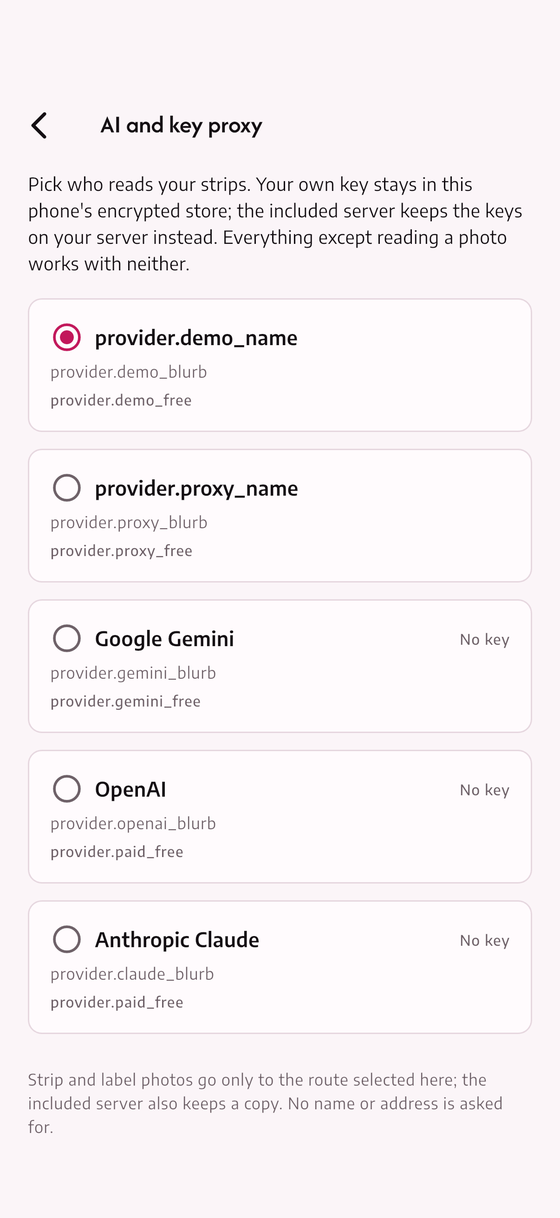
Settings → AI opens the AI and key proxy screen. It chooses who reads the photos:
| Route | Key | Good for |
|---|---|---|
| Demo mode | none | Trying the app and reviewing it. Answers on the device from the sample strip, through the real parser. Does not look at a photo. |
| The included server | on your server | Shipping to people who should never see a key. The app posts to your back end, which holds the keys and runs only the app's three jobs, within a daily limit per device and server-wide daily and monthly caps. |
| Google Gemini | the person's own | The easiest start: a key from AI Studio needs no card. |
| OpenAI | the person's own | Steady at keeping to the reply shape. Needs a payment method. |
| Anthropic Claude | the person's own | Careful with glare and a wet bottle. Needs a payment method. |
All three vendors are called over plain REST with the http
package; there is no provider SDK. A route that is picked but not set up (no
key, no server address) falls back to Demo mode, and the screens say so rather
than failing. Choosing a live route turns Demo mode off, which is the moment the
app starts keeping the person's own pools and tests.
Keys
A pasted key goes into the platform's encrypted store and is read back for
one request at a time, only by AiService. The screen shows whether a
key is saved, never the key. Every vendor's key page and rate-limits page are
linked from its card; no free allowance is quoted as a number, because vendors
change them.
Model names expire
Vendors retire model names every so often, and a retired name answers with an error the app turns into "The model is no longer available". Two places hold model names, and they are separate:
| Route | Default as shipped | Change it in the app | Change the default |
|---|---|---|---|
| Gemini | gemini-3.1-flash-lite | The Model name field on that route's card; it is kept per route and a blank field goes back to the default | packages/qh_ai/lib/src/gemini_provider.dart:32 |
| OpenAI | gpt-5 | packages/qh_ai/lib/src/openai_provider.dart:26 | |
| Claude | claude-opus-5 | packages/qh_ai/lib/src/claude_provider.dart:39 | |
| Your server | gpt-4o-mini, claude-haiku-4-5-20251001,
gemini-2.5-flash | not from the app: the app sends no model name on this route | The admin panel's AI proxy page, or the defaults at
app/Models/AiSetting.php:33 |
Each card links to the vendor's current model list. A model you choose must accept images: reading a strip is a vision job.
The included server
Enter the server's address on the The included server card
(origin only, such as https://<your-domain>) and Test the
connection. The app trades a random 32-character device key, made once per
install and not an OS device id, for a bearer token at
POST /api/ai/device, then reads strips through
POST /api/ai/chat. The card shows the server's own answer from
GET /api/ai/status: which vendors it has keys for and how many of
today's requests this device has used.
On this route the app sends no prompt. It names the job
(strip_read, label_read or explain_water) and
sends that job's input: the photograph with the strip's pad list, the label
photograph, or the test's figures for In plain words.
The server holds each job's instruction in config/ai_tasks.php
and chooses the provider and model itself, so a token copied off a phone can
only run these three jobs. The wording there is the same text the direct
routes send; test/proxy_tasks_sync_test.dart fails if the two
copies drift, so edit both together.
The text a job carries is data, and the server checks it as data: every line
of the pad list and of the figures must match the job's
input_line pattern, up to max_lines lines, or the
request is refused before any provider is called. That is what stops a copied
token from hiding a question of its own among the pads. The figures for
In plain words therefore travel in a fixed English vocabulary
(ph: 8.0 (target 7.4 to 7.6, high)), with the person's language as
a code on the last line; the sentences come back in that language. The pattern
lives in the job file (inputLine) and in
ai_tasks.php, and the sync test checks they are the same string. A
provider's own error text (which can quote part of a key) stays in the usage
log; the app is told only that the provider could not answer.
The server's chat route is provider-neutral, so there is nowhere on it to hang a structured-output schema. The server's instruction carries the schema instead, and the app reads the reply defensively (a code fence is unwrapped, prose before or after the object is trimmed), then runs the same parser. That is weaker than the direct routes' schema enforcement, which is why it is stated here. If the server revokes the token (a blocked device, a rebuilt database), the app registers once more and retries once; it never loops.
Spending caps on your server
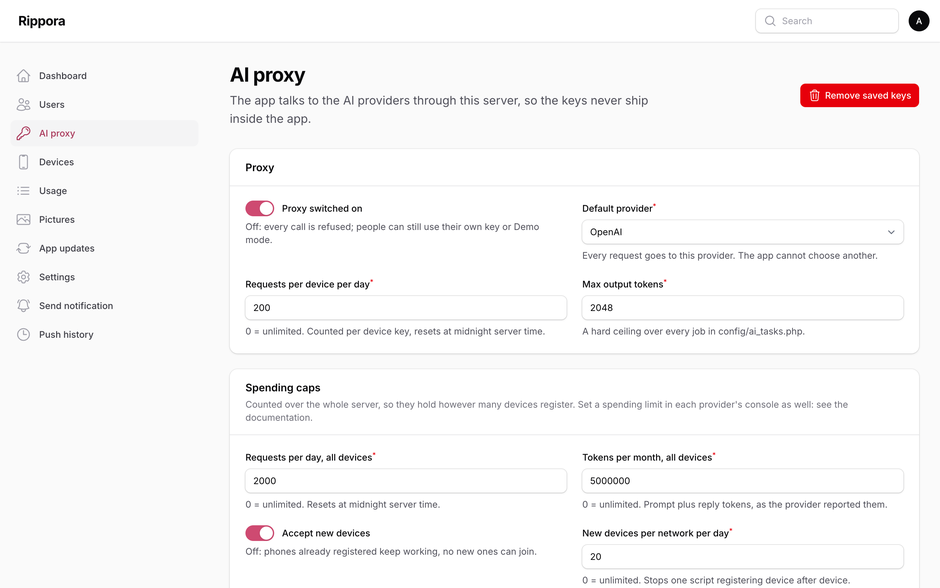
Every request on this route is paid from your provider account, so the AI proxy page has four limits. The first is per device; the other three count the whole server, so they hold however many devices register:
| Setting | Default | What it stops |
|---|---|---|
| Requests per device per day | 200 | one phone using more than its share |
| Requests per day, all devices | 2,000 | a busy or abused day running away |
| Tokens per month, all devices | 5,000,000 | the month's bill passing what you budgeted |
| New devices per network per day | 20 | a script registering device after device for fresh allowances |
Accept new devices switches registration off altogether; phones
already registered keep working. 0 turns a numeric cap off. A request counts
the moment it is accepted, not when the provider answers: it holds its job's
token ceiling against the month until the real figures arrive, so requests
sent all at once cannot slip past a cap together. An IPv6 address is counted
by its /64, the block one machine is usually given. Behind a reverse
proxy or Cloudflare, set TRUSTED_PROXIES so the per-network count sees
each phone's own address rather than the proxy's. Work the token budget out
from your provider's current price per million tokens.
Recommended spending limits at each provider
Set a hard limit where the bill is issued as well, so a mistake in one place is caught by the other, and use a key made for this server only.
- OpenAI: create a project for this server, use a key from that project, and set the project's monthly budget and usage limits.
- Anthropic: use a key from a workspace of its own and set that workspace's spend limit in the Console.
- Google Gemini: use a Google Cloud project of its own, set a budget with alerts in Cloud Billing, and lower the Generative Language API's requests per day quota for that project.
A sensible start is the monthly amount you would accept losing, for example US$20 to US$50 while you launch; raise it once the panel's Usage page shows what real users cost.
Locking the proxy to your app (App Check)
Optional, and off until you turn it on. Firebase App Check proves a request comes from your published app: Play Integrity on Android, App Attest or DeviceCheck on iOS, behind one token. With it enforced, a script that copied a device key off a phone still cannot call the proxy.
- Configure Firebase for the app (chapter Wiring left to you) and register the app in the Firebase console's App Check page with Play Integrity and App Attest.
- Add the
firebase_app_checkpackage, and inmain.dart, after Firebase starts, callFirebaseAppCheck.instance.activate(...)with those two providers. - Hand the app the token:
SettingsService.appCheckTokenSource = () => FirebaseAppCheck.instance.getToken();. The proxy route then sends it asX-Firebase-AppCheckwhen it registers and on every AI request, the two routes the server checks. - On the server, set
FIREBASE_CREDENTIALSand thenAI_APP_CHECK=enforcein.env. Do this last: once it is on, a phone that sends no token is refused.
Photos kept on the server
On this route the server also keeps a copy of every strip and label photo
the phone holds, so whoever runs the server has the pictures the AI read, not
only the figures. PhotoSync
(lib/app/data/services/photo_sync.dart) does it:
- When: about 10 seconds after a test or a product changes, and each time the app comes back to the foreground.
- Once per photo: it asks
GET /api/mediawhat the server holds (each file's name and SHA-256) and sends only what is new or changed, onePUT /api/media/<name>per file. - Only with a device token. The first strip read registers the install; until then there is nothing to send with. With the person's own key, in Demo mode or with no server address, nothing is sent.
- Silently. A photo that does not go now goes on the next change or the next return to the foreground; the screens show nothing either way, and a failure is at most counted in crash reports, when that pack is on.
The pictures appear on the panel's Pictures page under Device #n · platform (or the label you gave the device). Nothing is pulled back to a phone: a new phone registers as a new device and starts empty. Deleting a test on the phone does not delete the server's copy, and deleting a picture on the panel while the phone still has it only lasts until the next sync, which sends it again.
Error handling
Every failure is a ProviderException carrying a translation key,
so what the person reads is a sentence in their language with a next step, and
the raw response is behind Details for the developer.
| What happened | Key | What the person reads, in short |
|---|---|---|
| No key saved for a key route | err.missing_key | Add a key in Settings, or switch on Demo mode. |
| Vendor 401 / 403 | err.invalid_key, err.forbidden | The key was rejected, or accepted but refused (usually region or project). |
| Vendor 404 on the model | err.model_not_found | The model name is no longer available; enter a current one. |
| Vendor 429 | err.quota | The quota is used up for now. |
| Reply cut off | err.truncated | Run it again; it usually fits. |
| No server address | err.server_unset | Enter the address of your back end, or use your own key. |
| Server 401 after one re-registration | err.server_rejected | Check the address points at the right site. |
| Server 403 | err.device_blocked | This device was blocked on the server. |
| Server 413 | err.too_large | The photo is larger than the server accepts. |
| Server 429 | err.daily_limit | This device, or the server as a whole, used today's or this month's allowance. |
| Server 503 / 504 | err.server_off | The proxy is off, or has no key for that vendor. |
| No response | err.network, err.server_unreachable | Could not reach the service; Demo mode works offline. |
| Anything unparseable | err.bad_response | The reply was not in the expected format. |
A failed read loses nothing: pools and tests are as they were, and the pads can be picked by hand.
26Sign-in, from mock to live
The email and password form is a demo. Sign in and
Sign up wait a moment and open the app (lib/app/modules/auth/auth_controller.dart:67); no request is made,
and a line under each form says so. Empty fields get in too, so anyone trying the demo can
press Sign in without typing. Rippora keeps its records on the phone and
needs no account to work, so the form is there as the seam most buyers want,
drawn in the right place.
- Google and Apple (the
qh_social_loginpack) are real sign-ins once configured. WithAPI_BASE_URLset at build time, the id token is exchanged atPOST /api/auth/socialfor a Sanctum token, kept in the encrypted store. Without it they are as mock as the form. In Demo mode a fake provider stands in for both. - The back end has real account routes
(
POST /api/auth/register,POST /api/auth/login,GET /api/auth/me,POST /api/auth/logout), seeded with a demo account. The app's form does not call them as shipped; the wire-up chapter shows the change that makes it. - Strip reading does not use an account. The key proxy identifies installs by a device key, not by a person, so the included server works whether or not anyone signs in.
- Forgot password? opens a note: password reset belongs to your server, and is listed in the wire-up chapter.
27Wiring left to you
The app is complete for what it does. These are the pieces a real product connects that no template can connect for it, each with the exact place it goes.
Connect your backend to the sign-in form
The form is a demo (see the chapter Sign-in, from mock to live). To sign in against the included back
end, replace the body of login() in
lib/app/modules/auth/auth_controller.dart, and
register() the same way with /api/auth/register:
Future<void> login() async // lib/app/modules/auth/auth_controller.dart// before
isLoading.value = true;
await _fakeCall();
isLoading.value = false;
Get.offAllNamed(Routes.main);
// after
isLoading.value = true;
final res = await http.post(
Uri.parse('${FeatureConfig.apiBaseUrl}/api/auth/login'),
headers: {'Accept': 'application/json', 'Content-Type': 'application/json'},
body: jsonEncode({'email': emailCtrl.text, 'password': passwordCtrl.text}),
);
isLoading.value = false;
if (res.statusCode != 200) return; // show the server's message
final token = jsonDecode(res.body)['token'] as String;
await const FlutterSecureStorage().write(key: SocialAuthApi.tokenKey, value: token);
Get.offAllNamed(Routes.main);Storing the token under SocialAuthApi.tokenKey keeps password
and social sign-ins in one place. Password reset needs a route on your server
(Laravel's own password broker; mail is set up by the MAIL_* keys)
and a call from the Forgot password? link in
login_view.dart.
Real in-app purchases
Product ids in FeatureConfig.iapProductIds and
--dart-define=IAP=on (the chapter Setting up in-app purchases). The purchase is cached
on the phone, so a buyer opens the app as Pro offline. Receipt validation is
yours: StorePurchaseGateway takes a verify callback,
and returning false refuses the purchase.
final Future<bool> Function(PurchaseDetails details)? verify; // packages/qh_iap/lib/src/store_purchase_gateway.dartFirebase: push and analytics
lib/firebase_config.dart ships with
firebaseConfigured = false and lib/firebase_options.dart
holds deliberately invalid placeholders; the feature packs chapter has both the
flutterfire configure path and the no-terminal one. The admin panel
sends to every install through the topic. To notify one install (say, when a
month is running ahead), store the token qh_push reports against
that install's row in devices, through a route of your own, and send
to it from the server.
Another AI vendor
Write a class that implements AiAdapter, add a
ProviderConfig to ProviderCatalog.all and register the
adapter in AiService. No screen changes. Its model must read
images.
Future<Map<String, dynamic>> complete(   // packages/qh_ai/lib/src/ai_adapter.dart
  required PromptSpec spec, required String apiKey, String model = '',
});
What the app does not do, by design
It does not talk to a pool controller, a salt chlorinator or a probe, and it
does not sell or recommend products; readings come from a strip or are typed,
and doses are measured for what is on the shelf. A probe or controller
integration would be a new source of readings feeding PoolService,
the one place every figure is derived.
Where the numbers live
Every tunable constant, with its file and line:
| What | Where | Now |
|---|---|---|
| Tests the free plan keeps | lib/app/data/services/subscription_service.dart:110 | 50 |
| Largest photo the app sends, base64 | lib/app/data/services/ai_service.dart:41 | 1200 * 1024 bytes |
| Photo long edge and JPEG quality | lib/app/data/services/photo_store.dart:38 | 1600 px, 85 |
| How long a provider may take | packages/qh_ai/lib/src/ai_adapter.dart:16 | 120 s |
| Pads read from one strip, at most | lib/app/data/providers/strip_read_job.dart:28 | 8 |
| Pad list the app may send with a photo | lib/app/data/providers/strip_read_job.dart:54 | 600 characters |
| Sentences in In plain words | lib/app/data/providers/explain_water_job.dart:12 | 3 |
| Output tokens for a strip read (server, before the ceiling) | config/ai_tasks.php:98 | 1000 |
| Combined chlorine that asks for a shock | lib/app/data/engines/targets.dart:25 | 0.5 ppm |
| Balance index counted as balanced, either side of 0 | lib/app/data/engines/lsi_engine.dart:23 | 0.3 |
| Water temperature when none is entered | lib/app/data/engines/lsi_engine.dart:20 | 26 °C |
| Demo mode's pause before it answers | packages/qh_ai/lib/src/demo_provider.dart:32 | 1200 ms |
| Demo mode's "today" | lib/app/data/mock/sample_data.dart:14 | 3 Oct 2026 |
| Units before a person picks | lib/app/data/services/settings_service.dart:73 | US |
| Requests per device per day (server) | app/Models/AiSetting.php:36 | 200 |
| Output-token ceiling (server) | app/Models/AiSetting.php:37 | 2048 |
| Largest image the server accepts | config/companion.php:34 | 1258291 bytes |
| Images per request (server) | config/companion.php:38 | 2 |
The two image limits have to agree: the app refuses a photo it knows the
server will reject, so raise maxImageBytes and
AI_MAX_IMAGE_BYTES together or one of them does nothing.
28The key proxy, explained
backend/ is a Laravel 13 application with Filament 5 and
Sanctum, set up as a key proxy. It is included so that the
people who install your app never need an API key of their own: the app posts
the strip photo to your server, your server adds the key it holds and forwards
the request to OpenAI, Anthropic or Gemini, and the answer comes back.
- Devices, not accounts. Each install registers a random device key and gets a bearer token. The Devices page lists them; label one, block one (its token is revoked on the spot), see its request count.
- A daily limit per device (200 requests out of the box,
0 for none), counted per device key and reset at midnight in the server's
APP_TIMEZONE, so one install cannot run up your bill. - Server-wide caps that hold however many devices register: requests per day and tokens per month across all devices, at most 20 new devices per network per day, and a switch that stops new devices joining (see Spending caps on your server).
- Fixed jobs. The prompt for each of the app's three jobs
is in
config/ai_tasks.php; the app names a job and sends its input, never a prompt or a model. - A usage log. Every call is a row: provider, model, tokens
in and out, latency, and
ok,error,quotaorblocked. The dashboard charts it. - Provider keys held server-side, encrypted with
APP_KEY, set on the AI proxy page or in.env(the panel wins). The same page sets the provider and the model every request uses, the caps above and an output-token ceiling. - Pictures. Every strip and label photo the app has stored on the server (see Picking an AI route: key, proxy or demo), with a thumbnail, the device it came from, its size and a Delete action.
- App updates. Announce a release: the latest version, the
oldest one still allowed to run, what the update prompt says, the store links
and when it goes live.
GET /api/versionanswers with the newest published row, and with the.envvalues only while there is none. - Send notification and Push history. Push to every install now or at a time you pick; every send is recorded with its status, and a scheduled one can be canceled until it goes.
- The accounts, version and social routes the feature packs
use, including
POST /api/auth/apple/callback, the return URL for Sign in with Apple on Android.
The app also works without it: with a key of the person's own on any of the three vendor routes, or in Demo mode. The back end is what lets you ship the app to people who will never paste a key.
What is inside
| Folder | What |
|---|---|
app/Models | Device,
AiUsageLog, AiSetting (one row), plus
User, AppSetting, MediaFile (a stored
picture), AppRelease and PushSend. |
app/Services/Ai | ProxyService (settings,
quota, size checks, adapter, usage row) and one adapter per vendor, which turns
the neutral request into that vendor's own format, images included. |
app/Http/Controllers/Api | The REST controllers:
AiProxyController, AuthController,
SocialAuthController, AppleCallbackController,
VersionController, MediaController. |
app/Filament | The panel: Dashboard, Users, AI proxy, Devices, Usage, Pictures, App updates, Settings, Send notification, Push history. |
database/seeders | An admin, a demo account, three demo devices with two weeks of usage, a strip photo and a pool photo on the first of them, sample releases and push records, all flagged as demo data. |
tests | Pest: device registration, the proxy for each vendor, limits, image checks, reply language, accounts, social sign-in, the version route, panel pages. |
docs/DEPLOY.md | The deployment material from the next chapter, in a file you can hand to whoever runs the server. |
From here on, anything in <angle brackets> is a value you
supply and the brackets are not part of it.
29Setting up the admin panel, step by step
The admin panel is part of the Laravel application in backend/. These are the
steps for a server where you run the commands yourself; install.sh does steps 2 to 6
in one go, and the Docker route at the end needs none of them.
1. What the server needs
- PHP 8.4.1 or newer with the
pdo_mysql(orpdo_sqlite),mbstring,openssl,fileinfo,zipandintlextensions - Composer
- A database: MySQL 8 / MariaDB 10.6 or newer for a live server, or SQLite for a quick look
2. Create the environment file
cd backend
cp .env.example .env
Set APP_URL to the address the panel will be served from, and
APP_TIMEZONE to your own timezone.
3. Configure the database
MySQL or MariaDB. Create an empty database and a user that owns it,
then put them in .env:
DB_CONNECTION=mysql
DB_HOST=127.0.0.1
DB_PORT=3306
DB_DATABASE=rippora
DB_USERNAME=rippora
DB_PASSWORD=choose-a-strong-password
SQLite. Leave DB_CONNECTION=sqlite as shipped and create the
file it points at:
touch database/database.sqlite4. Install the dependencies and generate the app key
Install with the development packages included: the demo data in step 6 is generated
with them. Once the demo data is cleared you can reinstall with --no-dev.
composer install --optimize-autoloader
php artisan key:generate
Generate the key on the first install only. The server encrypts the settings it
stores with it, so a new key on a live server makes them unreadable; install.sh
skips this step when .env already has a key.
5. Create the tables
php artisan migrate --forceRun it again after every update you install; it only adds what is new and never drops your data.
6. Load the demo data, once
php artisan demo:seedThis creates the admin account below and the sample records on a fresh install,
and does nothing on every later run. When you are ready to go live, Settings →
Clear demo data in the panel (or php artisan demo:clear) removes every
seeded record and leaves yours; running the installer again afterwards does not bring
them back.
7. Serve it and sign in
Point your web server's document root at backend/public (docs/DEPLOY.md
in the back end covers web servers and shared hosting), or try it locally:
php artisan serveOpen /admin and sign in:
| Password | |
|---|---|
admin@rippora.test | password |
Change this password straight away under Users, or create your own admin account and delete this one.
8. Scheduled jobs
Notifications you schedule for later are sent by Laravel's scheduler. Add one cron line on the server:
* * * * * cd /path/to/backend && php artisan schedule:run >> /dev/null 2>&1Or: Docker
With Docker installed, steps 1 to 8 are one command. It starts MySQL, creates the tables, loads the demo data on the very first start only and runs the scheduler:
cd backend
docker compose up -d --build
The panel is then at http://localhost:8000/admin, with the same login.
docker compose down keeps your data; docker compose down -v deletes
it and the next start loads the demo data again.
30Hosting the key proxy
Three routes. Pick the one that matches your host. Whichever you choose, PHP must be 8.4 or newer.
A. Docker, if you have it
# in backend
docker compose up -d --build
This starts MySQL 8 and the app on http://127.0.0.1:8000 (panel
at /admin). On every start the container generates the application
key only if .env has none yet and runs the migrations (additive: they
only create what is missing). The demo data is seeded on the very first start
only; a restart never seeds again, so demo data you cleared in the panel
(Settings → Clear demo data) stays cleared. A restart, a
reboot of the machine or an upgrade of the image keeps every device, usage row,
account and saved key. Pictures are files, not rows, and they are kept in
volumes too: storage/app/private (the strip photos the app stores)
and public/uploads. Stop it with
docker compose down; docker compose down -v also deletes
the database and file volumes, and the next start begins from an empty database with the
demo data. If docker compose up cannot pull its images, your network
is blocking Docker Hub; that is the network, not the project, and routes B and C
need no Docker.
B. A terminal on a server you control
# in backend
./install.sh
The script checks your PHP version and Composer, copies
.env.example to .env if there is none, installs the
dependencies, generates the application key, creates the SQLite file if that is
the database, runs the migrations, seeds the demo data and makes the writable
folders writable. It stops with a readable message rather than a stack trace if
PHP is too old. Then point your web server's document root at
<path-to-backend>/public, not at the folder above it, which
holds .env.
Apache: the bundled public/.htaccess sends every request
through index.php; it needs mod_rewrite on and
AllowOverride All for that folder. Nginx: add
try_files $uri $uri/ /index.php?$query_string; to the site's
location / block and pass .php files to PHP-FPM.
C. Shared hosting, with cPanel and no terminal
- In cPanel, open MultiPHP Manager and set the domain to PHP 8.4 or newer. If the list stops at 8.3, ask your host to enable 8.4; this back end will not run below it.
- Create a MySQL database and a user, and give the user all privileges on it. Note the database name, the user and the password.
- Upload the contents of
backend/above your public folder, and the contents ofbackend/public/intopublic_html/. - Open
public_html/index.phpand fix therequirepaths so they point at where you put the rest. - Copy
.env.exampleto.envand fill inAPP_URL,DB_CONNECTION=mysql,DB_DATABASE,DB_USERNAME,DB_PASSWORD, and at least one ofAI_OPENAI_KEY,AI_ANTHROPIC_KEY,AI_GEMINI_KEY(or paste a key into the panel later). - Open cPanel's Terminal once for
php artisan key:generateandphp artisan migrate --seed, the only commands this route needs. No terminal at all?docs/DEPLOY.mdhas the phpMyAdmin route. - Make
storage/andbootstrap/cache/writable (file manager → Permissions), then visithttps://<your-domain>/admin.
The server needs outbound HTTPS to api.openai.com,
api.anthropic.com and
generativelanguage.googleapis.com; a few hosts block outbound
requests on their cheapest plans.
The scheduler (one cron line)
Notifications scheduled with Send notification → Send later go out from Laravel's scheduler, which needs one line in the server's crontab (cPanel: Cron Jobs, every minute):
* * * * * cd <path-to-backend> && php artisan schedule:run >> /dev/null 2>&1With Docker there is nothing to add: the app container runs the
scheduler itself. Without the line the panel
still works; a notification scheduled for later just stays
Scheduled. Times are read in APP_TIMEZONE.
Pictures users take
The photos the app stores through /api/media are files under
storage/app/private/media/, outside the web root. Back that folder
up together with the database: the database lists the pictures and the folder
holds them.
Signing in the first time
| Account | Password | |
|---|---|---|
| Admin (the panel) | admin@rippora.test |
password |
| Demo account (the account routes) | demo@rippora.app |
demo1234 |
Change the admin password, set APP_ENV=production and
APP_DEBUG=false, set the per-device and server-wide caps on the
AI proxy page to what you are willing to pay for (and a spending limit
at the provider), and run php artisan demo:clear (or
Settings → Clear demo data) to remove the demo accounts, devices
and usage rows. Back up .env and
storage/app/private/media/ with the database: the keys saved in the
panel are encrypted with its APP_KEY, and the folder holds the
pictures.
/admin.31Telling the app where the proxy is
Two ways to bake the address into a build, and a third for a single phone.
From the command line
flutter run --dart-define=API_BASE_URL=https://<your-domain>flutter build appbundle --dart-define=API_BASE_URL=https://<your-domain>
flutter build ipa --dart-define=API_BASE_URL=https://<your-domain>By editing a file
If you build from Android Studio or VS Code, open
lib/app/core/values/feature_config.dart and give the constant a
default. The line as shipped:
static const apiBaseUrl = String.fromEnvironment('API_BASE_URL');becomes:
static const apiBaseUrl = String.fromEnvironment('API_BASE_URL',
    defaultValue: 'https://<your-domain>');
That is the whole change. A --dart-define still wins when it is
passed.
Or on one phone, in Settings
Settings → AI → The included server → Server address. This routes strip reading through your server on that phone and overrides the built-in address. It is the quickest way to test a server, but it only affects the AI route and the photo copies that go with it: the version prompt and the Google / Apple exchange read the build-time address only.
Give the origin only: https://example.com, not
https://example.com/api; the app appends
/api/ai/… itself. A trailing slash is removed. On a real phone,
127.0.0.1 is the phone: use your computer's LAN address while
testing.
What happens next
A build with a built-in address opens with Demo mode off and the included
server chosen as the route, so the first strip a person photographs is read
through your server. The first request registers the install
(POST /api/ai/device) and it appears on the panel's
Devices page; each read is a row on Usage, and the photos
start to appear on Pictures shortly after. A person can still
switch to their own key or back to Demo mode in Settings.
32Plain HTTP versus HTTPS on the proxy
Both platforms refuse plain HTTP by default, and quietly enough that it looks like the server is down.
Android
Cleartext traffic is off by default. For development only, add to
android/app/src/main/AndroidManifest.xml:
<application android:usesCleartextTraffic="true" …>For anything narrower, use a network_security_config.xml that
allows the one development host, referenced with
android:networkSecurityConfig.
iOS
App Transport Security refuses http:// the same way. For
development only, in ios/Runner/Info.plist:
<key>NSAppTransportSecurity</key>
<dict>
  <key>NSAllowsLocalNetworking</key><true/>
</dict>
NSAllowsLocalNetworking covers a server on your own network
without opening the app to plain HTTP everywhere, which
NSAllowsArbitraryLoads would.
What this project ships with
Neither exception is in the source. The main Android manifest
declares INTERNET (Flutter only writes it into the debug manifest,
so a release build without it would fail every request),
USE_BIOMETRIC, POST_NOTIFICATIONS and
BILLING, and no cleartext flag; the plist has no ATS block. The
simulator reaches http://127.0.0.1 anyway, because iOS exempts it;
a physical phone does not.
In production, use HTTPS
A strip photo and a bearer token travel on every read, and on plain HTTP they travel in the clear to everyone on the same network. A Let's Encrypt certificate is free and most panels issue one in a couple of clicks. Remove any development exception before a release build.
33API reference
Every endpoint, 17 in all, as php artisan route:list
--path=api reports them. "Device" means a token from
/api/ai/device; "user" means one from the account routes. The AI
routes take a device token only and refuse a user token with a 403; the picture
routes take either, and each token sees only its own pictures.
| Method | Path | Auth | Body / returns |
|---|---|---|---|
POST | /api/ai/device | no | device_key (16 to 64 of A-Z a-z 0-9 _ -), platform, app_version → 201, token + device. Re-posting rotates the token. A new key is refused with 429 past the per-network daily cap, and with 403 while new devices are switched off. |
GET | /api/ai/status | device | enabled, default provider, each provider's availability, the job names it runs, the daily limit and this device's requests today, the token ceiling |
DELETE | /api/ai/device | device | Settings → Delete account: this device, its request log and every picture it stored, 204 |
POST | /api/ai/chat | device | task (a job in config/ai_tasks.php), input?, images?[{mime, data}], reply_in_user_language? → provider, model, text, usage, finish_reason. The server holds the prompt, provider, model and limits; the app cannot send them. |
POST | /api/auth/register | no | name, email, password → 201, token + user (403 if sign-up is switched off in Settings) |
POST | /api/auth/login | no | email, password → token + user |
POST | /api/auth/social | no | provider, id_token → token + user (503 until client ids are set) |
GET | /api/auth/me | user | the signed-in user |
POST | /api/auth/logout | user | revokes the token, 204 |
DELETE | /api/auth/me | user | Settings → Delete account: the account and its tokens, 204 (403 for the owner account) |
POST | /api/auth/apple/callback | no | Sign in with Apple's return URL on Android: Apple posts here and the server sends the phone back into the app with the same fields (303). 503 until APPLE_ANDROID_PACKAGE is set. |
GET | /api/version | no | latest, minimum, message, android_url, ios_url: the newest published row of App updates, or the .env values while there is none |
GET | /api/media | device or user | the caller's pictures (name, SHA-256, size), used_bytes, max_total_bytes, file_max_bytes |
PUT | /api/media/{name} | device or user | the picture's raw bytes as the body (JPEG, PNG, WebP, HEIC / HEIF or GIF, checked from the bytes) → 201, or 200 when it replaced a file or the same bytes were already there (a no-op). 413 over MEDIA_FILE_MAX_BYTES or when the caller's total would pass MEDIA_MAX_TOTAL_BYTES; 507 when the server-wide MEDIA_MAX_SERVER_BYTES is reached; 415 when it is not a picture; 422 when empty. |
GET | /api/media/{name} | device or user | the picture's bytes, 404 if the caller has none by that name |
DELETE | /api/media/{name} | device or user | deletes it, 204 |
GET | /api/media-preview/{media} | signed link | the picture behind a panel thumbnail; the panel makes these links itself, valid for ten minutes |
The routes that issue a token, and the Apple return URL, are limited to 10 requests a minute per address; everything else to 120 a minute per token.
Authentication headers
Authorization: Bearer <token>
Accept: application/json
Content-Type: application/json (on POST)Leave Accept off and a validation failure comes back as an HTML
page, the most common reason a client reports "invalid JSON" against a server
that is working. The app also sends Accept-Language, and the server
answers its errors in that language where it has a translation.
The three most used, in full
Register a device
curl -X POST https://<your-domain>/api/ai/device \
-H 'Accept: application/json' -H 'Content-Type: application/json' \
-d '{"device_key":"q7Zc2Lw9-Hf3xN0aRk5vT8mBy1sDe6Pu","platform":"ios","app_version":"1.0.0"}'{
"token": "4|Xk2m…",
"device": { "id": 4, "platform": "ios" }
}Ask what the server can do
curl https://<your-domain>/api/ai/status \
-H 'Accept: application/json' -H 'Authorization: Bearer <token>'{
"enabled": true,
"default_provider": "openai",
"providers": {
"openai": { "available": true },
"anthropic": { "available": false },
"gemini": { "available": false }
},
"tasks": ["strip_read", "label_read", "explain_water"],
"daily_request_limit": 200,
"requests_today": 3,
"max_output_tokens": 2048
}Read a strip
curl -X POST https://<your-domain>/api/ai/chat \
-H 'Accept: application/json' -H 'Content-Type: application/json' \
-H 'Authorization: Bearer <token>' \
-d '{
"task": "strip_read",
"input": "fc: 0, 0.5, 1, 3, 5, 10\nph: 6.2, 6.8, 7.2, 7.6, 8, 8.4",
"images": [{ "mime": "image/jpeg", "data": "<base64>" }]
}'{
"provider": "openai",
"model": "gpt-4o-mini",
"text": "{\"pads\":[{\"param\":\"fc\",\"index\":1,\"confidence\":\"high\"}, … ],\"note\":null}",
"usage": { "prompt_tokens": 1320, "completion_tokens": 214 },
"finish_reason": "stop"
}The model's answer is a string in text; the app parses it. The
server checks, in order: the proxy is on (503), the device is not blocked
(403), the job exists (422), the device's daily limit, the server's daily
limit and the month's token budget (429), a key for the provider (503), the
job's text size (413), then the job's number of images (one for each reader,
none for the explanation, never more than 2), each at most 1258291 bytes of valid base64 (413 or 422). Anything else in the
body, such as a system or model field, is ignored. A provider it cannot reach is a 504. Every outcome, refused
ones included, is written to the usage log.
141 Pest tests cover these routes.
34The .env file, line by line
Every environment variable in .env.example is on this page, so
you can check your file against it line by line. Copy .env.example
to .env and fill in the ones you need; the rest have working
defaults.
The ones you will set
| Key | Type | Default | What it does |
|---|---|---|---|
APP_NAME | text | Rippora | The name in the panel's title bar and in mail. |
APP_ENV | text | local | Set it to production on a live server. |
APP_KEY | text | required | Encryption key, also for the provider keys saved in the panel. php artisan key:generate writes it. Change it and those saved keys can no longer be read. |
APP_DEBUG | boolean | true | false in production. Left true, an error page shows your configuration to whoever triggered it. |
APP_URL | url | http://localhost | Used to build absolute links and the panel's assets. Set it to your real domain. |
APP_TIMEZONE | text | UTC | The zone "today" and "tomorrow" and every scheduled time are read in: the per-device daily limit's midnight, a notification sent later. For example Europe/London. |
TRUSTED_PROXIES | list | empty | Set it behind a load balancer or Cloudflare, or every install shares one registration rate limit. |
DB_CONNECTION | text | sqlite | sqlite, mysql or pgsql. |
SESSION_DRIVER | text | database | Where panel sessions live. |
CACHE_STORE | text | database | file is fine on shared hosting. |
QUEUE_CONNECTION | text | database | Nothing here queues work; leave it. |
LOG_CHANNEL | text | stack | Where storage/logs gets written. |
LOG_LEVEL | text | debug | error in production keeps the log small. |
AI_OPENAI_KEY | text | empty | OpenAI key, used when none is saved on the AI proxy page. |
AI_ANTHROPIC_KEY | text | empty | The same for Anthropic. |
AI_GEMINI_KEY | text | empty | The same for Gemini. |
AI_TIMEOUT_SECONDS | number | 90 | How long the server waits for a provider. Commented out in the file as shipped. |
AI_MAX_IMAGES | number | 2 | Images allowed in one request. Commented out in the file as shipped. |
AI_MAX_IMAGE_BYTES | number | 1258291 | Largest image, as base64 characters. Raise it with the app's maxImageBytes, never alone. Commented out in the file as shipped. |
APP_LATEST_VERSION | text | 1.0.0 | The version /api/version reports as current while no App updates row is published. Once one is, the panel wins. |
APP_MINIMUM_VERSION | text | 1.0.0 | Below this, the update prompt has no Later. Fallback, like the line above. |
APP_UPDATE_MESSAGE | text | empty | The sentence in the update prompt. Fallback. |
APP_STORE_URL_ANDROID | url | empty | Where the prompt's Update button goes on Android. Fallback. |
APP_STORE_URL_IOS | url | empty | The same on iOS. Fallback. |
MEDIA_FILE_MAX_BYTES | number | 2097152 | Largest picture /api/media stores (2 MB). A photo at the app's settings is a few hundred KB. Past 8 MB, raise post_max_size and upload_max_filesize in php.ini above it too. |
MEDIA_MAX_TOTAL_BYTES | number | 209715200 | Picture space per device or account (200 MB). Past it, a new picture is refused with 413 and the phone tries again later. |
MEDIA_MAX_SERVER_BYTES | number | 5368709120 | Picture space for every device and account together (5 GB; 0 = no server-wide cap). Past it, new pictures are refused with 507, so devices that are cheap to create cannot fill the disk. |
GOOGLE_CLIENT_IDS | list | empty | OAuth client ids accepted by /api/auth/social for Google, comma-separated. |
APPLE_CLIENT_IDS | list | empty | Bundle / Services ids accepted for Apple. |
APPLE_ANDROID_PACKAGE | text | empty | Sign in with Apple on Android only: the app's Android package name. /api/auth/apple/callback sends the phone back into that app, and answers 503 while this is empty. |
AI_APP_CHECK | off / enforce | off | enforce refuses device and chat requests without a valid Firebase App Check token. Needs FIREBASE_CREDENTIALS and App Check on in the app first. Commented out in the file as shipped. |
FIREBASE_CREDENTIALS | path | storage/app/firebase-service-account.json | The Firebase service-account JSON the Send notification page uses. Keep it outside public/. |
Everything else in the file
Laravel's own defaults. Most are read only if you switch a driver above to something other than what this back end ships with.
| Key | Default | What it does |
|---|---|---|
APP_LOCALE | en | Language for panel text, dates and validation messages. |
APP_FALLBACK_LOCALE | en | Used when a string is missing in the locale above. |
APP_FAKER_LOCALE | en_US | Only used by test factories. |
APP_MAINTENANCE_DRIVER | file | Where php artisan down keeps its flag. |
APP_MAINTENANCE_STORE | database | Cache store for the flag, when the driver is a cache. Commented out in the file as shipped. |
PHP_CLI_SERVER_WORKERS | 4 | Workers for artisan serve only. Commented out in the file as shipped. |
BCRYPT_ROUNDS | 12 | Password hashing cost. Higher is slower and safer. |
LOG_STACK | single | Which channels the stack channel writes to. |
LOG_DEPRECATIONS_CHANNEL | null | Where PHP deprecation notices go. |
DB_HOST | 127.0.0.1 | Only read when DB_CONNECTION is not sqlite. On MySQL, DB_DATABASE is the database name, not a path. Commented out in the file as shipped. |
DB_PORT | 3306 | Only read when DB_CONNECTION is not sqlite. On MySQL, DB_DATABASE is the database name, not a path. Commented out in the file as shipped. |
DB_DATABASE | laravel | Only read when DB_CONNECTION is not sqlite. On MySQL, DB_DATABASE is the database name, not a path. Commented out in the file as shipped. |
DB_USERNAME | root | Only read when DB_CONNECTION is not sqlite. On MySQL, DB_DATABASE is the database name, not a path. Commented out in the file as shipped. |
DB_PASSWORD | empty | Only read when DB_CONNECTION is not sqlite. On MySQL, DB_DATABASE is the database name, not a path. Commented out in the file as shipped. |
SESSION_LIFETIME | 120 | Minutes before a panel session expires. |
SESSION_ENCRYPT | false | Whether Laravel encrypts the panel's session data. |
SESSION_PATH | / | Cookie path for the panel session. |
SESSION_DOMAIN | null | Cookie domain. Leave null unless you run subdomains. |
BROADCAST_CONNECTION | log | Event broadcasting. Nothing here broadcasts. |
FILESYSTEM_DISK | local | Default disk. The pictures in /api/media always go to the local disk (storage/app/private/), whatever this says. |
CACHE_PREFIX | empty | Prefix for cache keys, if you share a cache server. Commented out in the file as shipped. |
MEMCACHED_HOST | 127.0.0.1 | Only read when CACHE_STORE is memcached. |
REDIS_CLIENT | phpredis | Only read when a cache, queue or session driver is set to redis. |
REDIS_HOST | 127.0.0.1 | Only read when a cache, queue or session driver is set to redis. |
REDIS_PASSWORD | null | Only read when a cache, queue or session driver is set to redis. |
REDIS_PORT | 6379 | Only read when a cache, queue or session driver is set to redis. |
MAIL_MAILER | log | Outgoing mail. Ships as log, which writes mail to storage/logs instead of sending it. |
MAIL_SCHEME | null | Outgoing mail. Ships as log, which writes mail to storage/logs instead of sending it. |
MAIL_HOST | 127.0.0.1 | Outgoing mail. Ships as log, which writes mail to storage/logs instead of sending it. |
MAIL_PORT | 2525 | Outgoing mail. Ships as log, which writes mail to storage/logs instead of sending it. |
MAIL_USERNAME | null | Outgoing mail. Ships as log, which writes mail to storage/logs instead of sending it. |
MAIL_PASSWORD | null | Outgoing mail. Ships as log, which writes mail to storage/logs instead of sending it. |
MAIL_FROM_ADDRESS | hello@example.com | Outgoing mail. Ships as log, which writes mail to storage/logs instead of sending it. |
MAIL_FROM_NAME | ${APP_NAME} | Outgoing mail. Ships as log, which writes mail to storage/logs instead of sending it. |
AWS_ACCESS_KEY_ID | empty | Only read when a disk is set to s3. |
AWS_SECRET_ACCESS_KEY | empty | Only read when a disk is set to s3. |
AWS_DEFAULT_REGION | us-east-1 | Only read when a disk is set to s3. |
AWS_BUCKET | empty | Only read when a disk is set to s3. |
AWS_USE_PATH_STYLE_ENDPOINT | false | Only read when a disk is set to s3. |
VITE_APP_NAME | ${APP_NAME} | Only read by a front-end build, which this back end does not use. |
72 of the 72 keys in .env.example, counted when
this page was built.
Read by the back end but not in the file
config/companion.php also reads these. Add them to
.env only if you need them:
| Key | What it does |
|---|---|
AI_ANTHROPIC_ENDPOINT | The Anthropic endpoint. |
AI_GEMINI_ENDPOINT | The Gemini endpoint. |
AI_MAX_INPUT_CHARS | A ceiling over every job's own text limit in config/ai_tasks.php, in characters (images are counted separately). Default 60000. |
AI_OPENAI_ENDPOINT | The OpenAI endpoint, for a compatible gateway. |
php artisan config:clear. Laravel caches the configuration, and
a changed key behind a stale cache is the most common "I set it and nothing
happened".
35Running the proxy without a terminal
Everything the server does day to day is in the panel. This chapter covers the jobs that usually want a terminal, done without one. The one thing that runs on a timer is a notification scheduled for later, and that needs the scheduler's cron line from the chapter on putting it on a server.
| Job | In the panel | In cPanel or phpMyAdmin |
|---|---|---|
| Add or replace a provider key | AI proxy → the key field, Save | or AI_*_KEY in .env with the file manager |
| Change the model when a name is retired | AI proxy → the provider's model | |
| Switch the proxy off for a while | AI proxy → Proxy switched on; the app then says the server is not answering, and the person can switch to their own key or Demo mode | |
| Change the daily limit | AI proxy → Requests per device per day (0 = none) | |
| Stop one install using the proxy | Devices → Block on its row (its token is revoked) | |
| See what it is costing | Usage, filtered by provider or status; tokens in and out per call | |
| Tell every install something | Send notification (needs the Firebase key); fill Send later to schedule it | |
| See what was sent, or stop a scheduled one | Push history → Cancel on a scheduled row | |
| Ask everyone to update the app | App updates → New: latest and minimum version, the message, the store links, when it goes live | |
| See or delete the photos an install sent | Pictures → Delete on a row, or select several. A photo the phone still holds is sent again on its next sync. | |
| Remove an install and what it left here | Devices → Delete on its row; its usage rows and pictures go with it | |
| Stop people creating accounts | Settings → Let new users sign themselves up | |
| Add an administrator | Users → New, role admin | |
| Back up the database | phpMyAdmin → the database → Export → Quick → SQL. Keep the file, a copy of .env and the folder storage/app/private/media/ (file manager → Compress) off the server. | |
| Restore a backup | phpMyAdmin → Import → the .sql file. | |
| Clear the demo data | Settings → Clear demo data. It removes only the seeded records (the demo pictures, releases and push records included) and asks first. | cPanel Terminal: php artisan demo:clear does the same. |
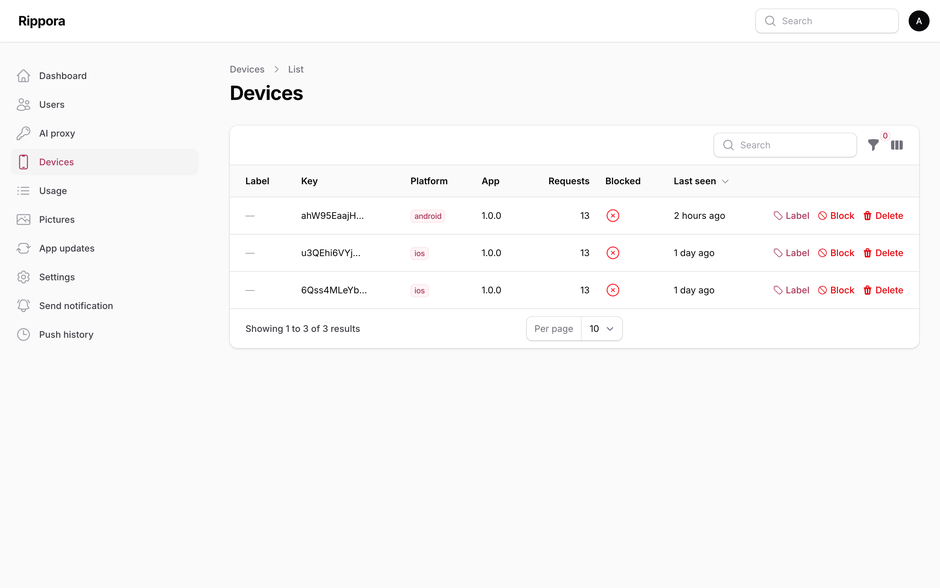
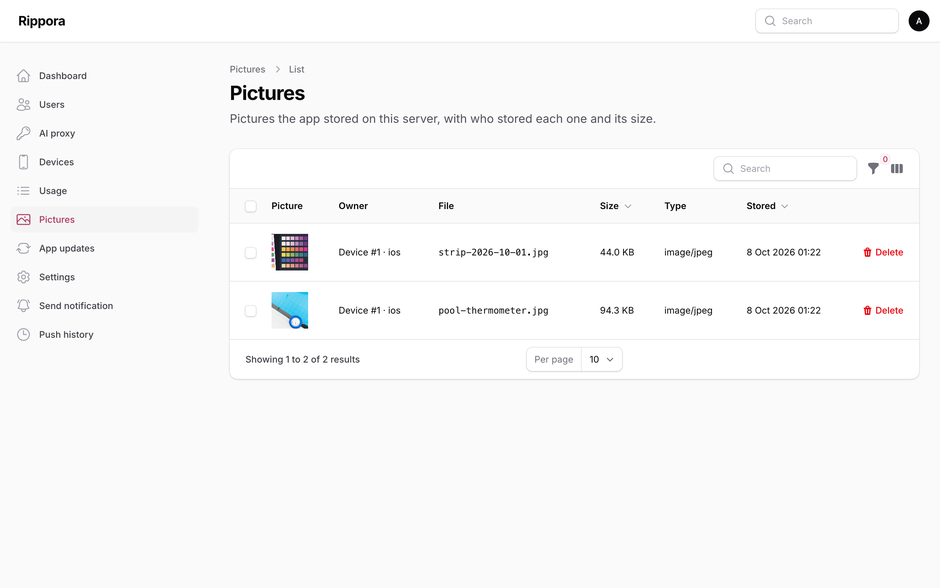
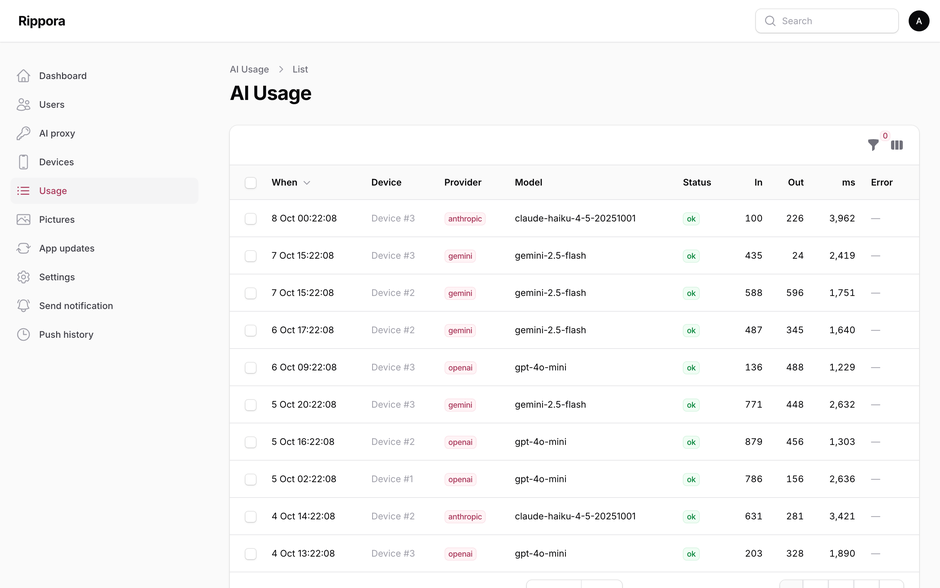
GUI tools that work with this back end
- phpMyAdmin, on nearly every shared host.
- TablePlus or Sequel Ace, a desktop client over SSH, if your host allows it.
- DB Browser for SQLite, which opens
database/database.sqlitedirectly on the default database.
36Installing a later version of Rippora
When a newer release of this item arrives, you want its fixes without losing your own work. These are the files a buyer usually changes, and what to do with each.
| Keep yours | Take the new one |
|---|---|
backend/.env (and its APP_KEY: the saved provider keys depend on it) | backend/app/ |
backend/config/*.php if you edited any | backend/routes/ |
Your database, and backend/storage/app/private/media/ (the pictures) | backend/database/migrations/ |
assets/icon/, assets/images/pool/ | rippora_ai_app/lib/, except the files on the left |
lib/app/core/theme/app_colors.dart, app_text_theme.dart, lib/app/core/values/feature_config.dart, lib/firebase_*.dart | test/, integration_test/, packages/ |
Your sentences in lib/l10n/ | pubspec.yaml, merged rather than replaced if you added packages |
The safe order
- Back up the database,
.envandstorage/app/private/media/first. - Unzip the new version beside the old one, not over it.
- Diff the two trees (VS Code: select two folders, Compare; or
diff -r <old> <new>). - Copy the new files over, skipping the left-hand column.
composer install, thenphp artisan migrate, thenphp artisan config:clear.flutter pub getand run the app.
Are the migrations safe on a live database?
Yes, for this release. Every migration creates a table or adds
a column; the only drop calls are in their down()
methods, which run on a rollback, never on migrate. So
php artisan migrate on a database with your devices and usage in it
is additive. You can check a future release before you run it: a migration that
removes something contains dropColumn, dropIfExists or
renameColumn in its up(). migrate:fresh is
a different command and drops everything; see the commands chapter.
On the phone
A person's pools, tests, products and strip profiles are kept under versioned keys
(schemaVersion on each model), so an app update reads what the old
version saved. If you change a model's fields, raise its
schemaVersion and handle the old shape in its
fromJson.
Keeping customizations easy to carry
Colors and type in the two theme files, switches in
feature_config.dart, copy in the l10n files, and anything genuinely
yours in new files rather than as edits to existing ones. The further your
changes are from the files this item ships, the shorter your next upgrade.
37Who bills you: providers, stores, Firebase
The app runs on the phone and the back end on your own hosting; Demo mode calls nothing at all. What costs money is whatever you connect:
| Service | Needed for | Who pays |
|---|---|---|
| Google (Gemini), OpenAI or Anthropic API | Reading real strips and labels, and the three sentences | With a person's own key, that person. Through the included server, you, per request, to the vendor whose key the server holds. Set the caps on the AI proxy page and a spending limit at the vendor accordingly. |
| Web hosting with PHP 8.4 and MySQL, or a VPS | The back end | You, to your host |
| Apple Developer Program | Publishing on the App Store, Sign in with Apple, push on iOS | You, to Apple: an annual membership fee |
| Google Play Console | Publishing on Google Play | You, to Google: a one-time registration fee |
| Firebase | Push, analytics and crash reports (the feature packs) | You; the free tier covers a small app |
| A mail provider | Password reset mail, if you add it | You, per message |
A strip read is one request with one photo; In plain words is one small text request each time it is asked. Current prices and free allowances are on each vendor's own pricing and rate-limits pages, linked from the AI screen; this manual quotes none, because they change.
Publishing on the stores needs your own developer accounts: Apple charges an annual fee for the Apple Developer Program, and Google a one-time fee for a Play Console account. The AI vendors bill every request made with their key, for as long as the app is in use.
Connecting any of these will involve third-party services, and those services will incur their own separate costs, billed by the provider to you. None of them is included in this item.
38Release builds and store submission
From a working app to something the stores accept.
Android
- Create a keystore, once, and keep it safe; losing it means you can never
update the app under the same listing:
keytool -genkey -v -keystore <path-to-keystore>/upload.jks \ -keyalg RSA -keysize 2048 -validity 10000 -alias upload - Create
android/key.properties(keep it out of git and out of any archive you share):storePassword=<password> keyPassword=<password> keyAlias=upload storeFile=<path-to-keystore>/upload.jks - In
android/app/build.gradle.kts, read that file in asigningConfigsblock and pointbuildTypes.releaseat it (Flutter's "Build and release an Android app" page has the exact block). The project ships with debug signing so it runs out of the box. flutter build appbundle --release; the file lands atbuild/app/outputs/bundle/release/app-release.aab.- Upload it in the Play Console under Production → Create new release. Google Play wants an AAB; the APK is for sideloading.
iOS
- Open
ios/Runner.xcworkspacein Xcode. - Select the blue Runner project, then the Runner target, then the Signing & Capabilities tab.
- Tick Automatically manage signing and choose your
Team; Xcode creates the provisioning profile. The Push
Notifications and Sign in with Apple capabilities are already listed there
(from
Runner.entitlements); remove either if you will not use it. - Set the Bundle Identifier to one registered to your team, and the same prefix on the RunnerTests target.
flutter build ipa --release; it lands atbuild/ios/ipa/.- Upload with Transporter (free on the Mac App Store) or Xcode → Window → Organizer → Distribute App, then submit in App Store Connect.
The privacy keys App Review will ask about
ios/Runner/Info.plist carries three usage descriptions, and each
sentence should name your app if you rename it:
| Key | Why |
|---|---|
NSCameraUsageDescription | Taking a photo of a test strip or a product label. |
NSPhotoLibraryUsageDescription | Choosing a photo of a test strip or a product label. |
NSFaceIDUsageDescription | The lock-on-launch switch. |
UIBackgroundModes lists remote-notification for
push. On Android the manifest declares INTERNET,
USE_BIOMETRIC, POST_NOTIFICATIONS and
BILLING; the camera is reached through the system picker and needs
no permission of its own. In App Store Connect's privacy answers and the Play
Console's data safety form, say that strip and label photos are sent to the AI provider (or
your server) the person chose, to read the printed figures, and are not used to
identify them. If you ship with the included server as the route, also say that
the photos are stored on your server, linked to the install (not to a named
person), until you delete them.
Before you submit
- Bump
version:inpubspec.yaml(1.0.0+1): the part before the plus is what people see, the part after is the build number, and every upload needs a higher one. KeepappVersioninlib/app/data/services/settings_service.dartin step: it is what the app reports to your server. - Replace the launcher icon, the app name and the sample photographs.
- Decide what a fresh install opens on: Demo mode (as shipped), or your server
via
API_BASE_URL. Anyone trying the app can use either without a key.
39Commands
In the app folder
| Command | What it does |
|---|---|
flutter pub get | Fetch the packages. Run it after any change to pubspec.yaml. |
flutter run | Run on the connected device or simulator, in Demo mode. |
flutter run --dart-define=API_BASE_URL=<url> | Run with your server built in: Demo mode off, strips read through the proxy. |
flutter run --dart-define=LOCALE=es | Pin one language for this build. |
flutter run --dart-define=IAP=on | Use the real store for purchases (needs product ids). |
flutter analyze | Static analysis. Ships with zero issues. |
flutter test | The unit and widget tests. |
flutter drive --driver=test_driver/integration_test.dart --target=integration_test/screenshots_test.dart -d <device> | Walk every screen and write screenshots. |
flutter build appbundle --release | The bundle Google Play wants. |
flutter build ipa --release | The archive App Store Connect wants. |
flutter build apk --release | An APK for sideloading. |
dart run flutter_launcher_icons | Regenerate every launcher icon from assets/icon/. |
flutter clean | Delete build output. Harmless, and the first thing to try when a build fails for no reason. |
In the back end folder
| Command | What it does |
|---|---|
./install.sh | First-time setup: dependencies, key, database, demo data. Safe to run again: it keeps an existing .env and APP_KEY, so the saved AI keys stay readable, and loads the demo data only once per database. |
composer install | Fetch the PHP dependencies. |
php artisan serve | A development server on port 8000. |
php artisan migrate | Apply new migrations. Additive in this release: nothing is dropped or renamed. |
php artisan demo:seed | Load the demo accounts, devices and usage on a fresh install. It runs once per database: after Clear demo data, or on a server that already has real accounts, it loads nothing. |
php artisan route:list --path=api | Print every API route, as the API reference lists them. |
php artisan config:clear | Forget the cached configuration. Run it after editing .env on a live server. |
composer test | The Pest suite. |
docker compose up -d --build | Start the Docker stack. Keeps the database and pictures across restarts: migrations are additive and the demo data is seeded on the first start only. |
docker compose down | Stop the Docker stack. |
The commands that destroy data
php artisan migrate:fresh --seed drops every table in the
database and rebuilds it, then inserts the demo data. Devices, usage
rows, accounts and the provider keys you saved in the panel are gone. There is no
confirmation prompt in a non-interactive shell and no undo. Use it on a laptop,
never on a live server.
php artisan demo:clear deletes every row flagged as demo data,
including the demo admin account. It asks first unless given
--force. That is what you want before going live, once you have
created an admin of your own; back up first.
docker compose down -v deletes the Docker database volume along
with the containers.
40Troubleshooting
The app will not build
| Symptom | Cause | Fix |
|---|---|---|
Unsupported class file major version, or Gradle complains about Java | Gradle is using a JDK that is too new or too old. | Install JDK 17 and point Flutter at it: flutter config --jdk-dir <path-to-jdk-17>. |
Minimum supported Gradle version is … | An older Flutter SDK than the project needs. | flutter upgrade to 3.47 or newer. |
| Xcode stops at Resolving Package Graph or reports a package it could not fetch | Xcode could not download a plugin's Swift package (no network, a proxy, or a stale cache). | In Xcode, File → Packages → Reset Package Caches, then build again; behind a proxy, let Xcode reach github.com. |
The IDE underlines every import but flutter run works | The editor does not know where the Dart SDK is. | VS Code: Flutter: Change SDK. Android Studio: Settings → Languages & Frameworks → Flutter. |
Could not find package qh_… | packages/ was deleted or moved. | Put it back beside lib/; the feature packs are part of the project. |
| A build that used to work fails after a package change | Stale build output. | flutter clean && flutter pub get. |
The app runs but reading does not
| Symptom | Cause | Fix |
|---|---|---|
| Every read returns the sample strip | Demo mode is on, or the route you picked has no key or address yet, so Demo mode is answering. | Settings → AI: pick a route and add its key or server address. The screen says when it is falling back. |
| "The model … is no longer available" | The vendor retired the model name. | Enter a current one on that route's card; on your server, on the AI proxy page. |
| "Could not reach your server" | The address is wrong, or the phone cannot see it. | On a real phone 127.0.0.1 is the phone: use your computer's LAN address, same Wi-Fi. Check the address has no /api. |
| "Your server is not set up to answer yet" | The proxy is switched off, or has no key for its default provider. | Panel → AI proxy: switch it on, add a key. GET /api/ai/status shows which providers are available. |
| "That photo is larger than your server accepts" | The image is over AI_MAX_IMAGE_BYTES. | Raise it together with the app's maxImageBytes, or take the photo a little further away. |
| No Google / Apple buttons | Demo mode is off and there are no client ids in feature_config.dart. (In Demo mode both always show.) | See the chapter Setting up Google and Apple sign-in. |
The back end
| Symptom | Cause | Fix |
|---|---|---|
| A blank white page, and the URL shows your domain | The document root points at the folder above public/. | Point it at <path-to-backend>/public. Until you do, .env is downloadable. |
| A blank white page (or a 500), and the document root is already right | A different fault with the same symptom: storage/ and bootstrap/cache/ are not writable. | Make both writable by the web server: cPanel file manager → Permissions, or chmod -R ug+w storage bootstrap/cache. If storage/logs/laravel.log is empty or missing, this is almost certainly it. |
syntax error, unexpected token in a vendor file | PHP is older than 8.4. | cPanel → MultiPHP Manager → 8.4. php -v shows what you are really running. |
A change to .env has no effect | The configuration is cached. | php artisan config:clear. |
| Keys saved in the panel stopped working after a move | APP_KEY changed; the saved keys were encrypted with the old one. | Restore the old APP_KEY, or paste the keys again. |
SQLSTATE[HY000] [2002] | Wrong database host or credentials. | Check the DB_* keys; on shared hosts the names are prefixed with your account name. |
| Every install gets "too many attempts" at once | The server is behind a proxy it does not trust, so every install looks like one address. | Set TRUSTED_PROXIES. |
| Chat answers 504 | The server cannot reach the provider. | Ask your host whether outbound HTTPS is allowed on your plan. |
| A notification sent for later stays Scheduled | The scheduler's cron line is missing. | Add it (the chapter on putting it on a server), and check APP_TIMEZONE is your zone. |
| An install's photos stop appearing on Pictures | It has used its picture space (MEDIA_MAX_TOTAL_BYTES), so new ones are refused with 413; or the phone is on its own key or Demo mode, which sends none. | Raise MEDIA_MAX_TOTAL_BYTES. Deleting pictures on Pictures frees space only for photos the phone no longer holds (tests deleted on the phone); the rest are sent again. |
| The panel loads without styling | APP_URL does not match the address you are browsing. | Fix it, then php artisan config:clear. |
41Glossary
| Term | Meaning here |
|---|---|
| Pad | One square on a test strip that changes color with one reading. |
| Strip profile | Which pads a strip has, in order, and the values printed beside each on the bottle. |
| Free / total / combined chlorine | Chlorine still working; all chlorine; the difference, which has already reacted and asks for a shock when it passes 0.5 ppm. |
| CYA | Cyanuric acid, the stabilizer that shields chlorine from sunlight. |
| Balance index (LSI) | The Langelier Saturation Index: below −0.3 corrosive, above +0.3 scaling. |
| Bench | The products to add for one test, in order, with their amounts and waits. |
| Job | One kind of request to a model, with its own instruction, schema and parser. |
| Route | Who answers a job: Demo mode, Gemini, OpenAI, Claude or your server. |
| Key proxy | The back end: it holds the provider keys and forwards requests for registered installs. |
| Device key | A random 32-character id made once per install and traded for a bearer token. |
| Demo mode | The sample pools and the on-device answer; nothing is written to disk. |
| Feature pack | One of the small packages in packages/, switched on in feature_config.dart. |
| Sanctum token | The bearer token the back end issues. |
| Filament | The admin panel framework the back end uses. |
--dart-define | A value passed to a Flutter build from the command line, read with String.fromEnvironment. |
42Questions buyers ask
Does the app need the back end?
To try it, no: Demo mode answers on the device and every screen works. To read real strips it needs a model, through either a key the person pastes in or the back end in the same download. The back end is what lets you ship without asking anyone for a key.
Does the AI work out the dose?
No. It says which printed square each pad is nearest, and the person confirms every one. Every dose, order, wait and balance figure is arithmetic on the phone, in the engines, and the same inputs give the same answer everywhere.
Does it say the water is safe to swim in?
No, and nowhere in the app does. It shows where each reading sits against a common target and measures what to add; the product label and a professional test have the last word.
Does it work with my strips?
Yes. Three profiles are built in, and a person can build one from the values printed on their own bottle. The reader is handed the profile with the photo.
What does a strip photo reveal?
The photo goes to the route the person chose. When the person reads strips through the included server, that server keeps a copy too, listed on the panel's Pictures page under the install, not a name.
US or metric?
Both. Settings switches gallons, °F and ounces to liters, °C and grams; everything is stored metric.
Can I change the colors and the typefaces?
Yes: one file for colors and one for type. See those two chapters.
Which languages?
English, Spanish and Arabic (3), including right-to-left. Adding one is a file and a line.
43Getting help, and what the licenses allow
Support
Questions about setup, the AI routes, the back end or re-skinning are answered through the item's comments. Item support covers this item as shipped; it does not cover a provider's own account, quota or billing, or code you have changed.
Licenses
- Typefaces: Afacad, Encode Sans and Tektur, SIL Open Font
License 1.1:
assets/fonts/LICENSES.txt. - Photographs: Pexels License, each file and its source in
assets/images/pool/LICENSES.txt. - Flutter packages and PHP packages: their own licenses, in
pubspec.lockandcomposer.lock. The back end's Spanish and Arabic validation files come from Laravel-Lang (MIT,lang/LICENSE-Laravel-Lang.txt). - The landing page uses the same typefaces and screenshots of this app, and is yours to edit and publish.
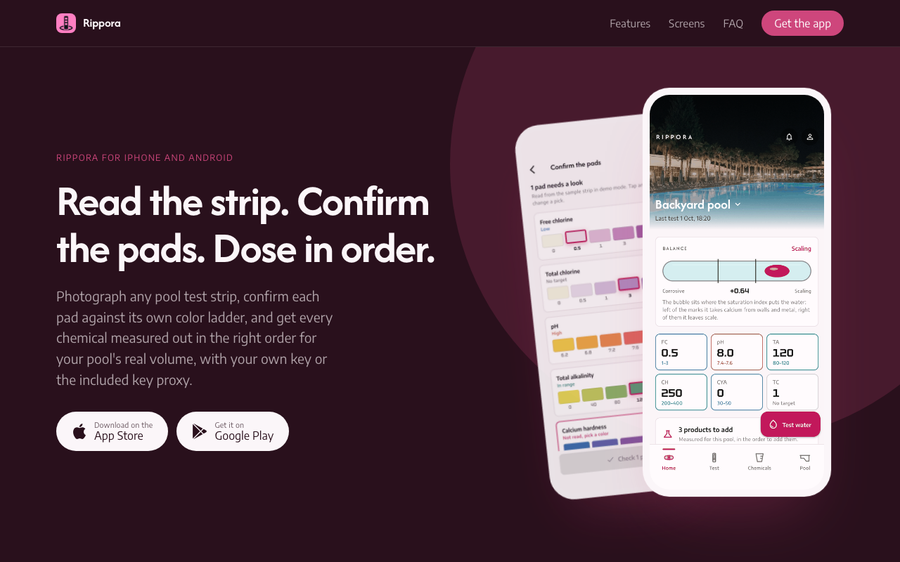
landing/index.html: a one-page site
for your own app, in its colors and typefaces, with its own screenshots.