Testing Emojis - 😄😃💎👽
Introduction
This class eliminates common difficulties when trying to display Tweets on your website or web application. Most methods of loading Tweets are effective, but unfortunately limited when it comes to customization. With this class, you're able to design your own feed. With a little bit of pre-existing knowledge of HTML you're also able to create your own format without editing any code in the class.
Features
Customization
With over 30 options to choose from, and a custom formatting feature this class has endless possibilites.
Conservation
This class caches feed data to save bandwidth for both you and Twitter, resulting in faster load times.
Efficiency
Methods used in this class have been proven to be faster than most traditional methods. Efficiency is key when running a successful website.
Ease of Use
Implementation of this class is a breeze. Don't hassle with getting things to work when it only takes a couple steps to install.
Emoji Support
Detect Emoji characters made popular on mobile devices such as iPhone or Android and replace them with their respective icon viewable on web.
Search Support
Use Twitter's search API as well as many other endpoints.
Multiple Screen Names
Display multiple screen names in a single feed. The class automatically puts the tweets in chronological order. This applies for any endpoint that supports it, such as Search.
1. Create Twitter Application
Twitter's API
v1.1 requires all transactions to be authorized by user context. This means that in order to use this script you will need to create a Twitter application to obtain a
consumer key, consumer secret, access token, and access token secret.
These are used to authenticate your application via oAuth.
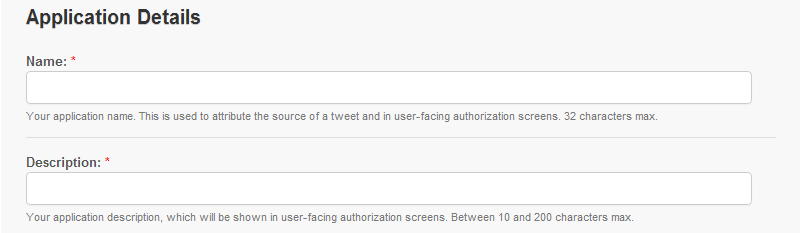
After logging into https://www.dev.twitter.com/, navigate to https://dev.twitter.com/apps/new and enter the requested information.
Once you have successfully created an application, navigate to the bottom of the page and click "Create my access token". This is required to query for a user's tweets on their timeline.

And you're done! You can view your keys on the "Details" tab of your application.
2. Include Files
In this zip, you should have the folder
src/. This includes the Twitter class as well as other files needed in order for this script to work. Copy that folder relative to your php file. Finally, include the class.
require_once 'src/ultimate.twitter.feed.php';
3. Construct Class
Next, we're going to construct a new instance of the Twitter class. The example below shows the options required to be passed into the constructor function. You can find where to get your keys in the first step.
Note that the option screen_name and
user_id are interchangeable. Meaning that one must be passed, but not both.
$options = array(
    'screen_name' => 'MyScreename',
    'consumer_key'  => 'CONSUMER KEY',
    'consumer_secret' => 'CONSUMER SECRET',
    'user_token' => 'ACCESS TOKEN',
    'user_secret' => 'ACCESS TOKEN SECRET',
);

$twitter = new Twitter($options);
4. Print a Feed
Finally, you can print a users Tweet feed. The class uses the options provided to format each tweet.
$twitter->PrintFeed();
Optionally you can pass a callback function to
PrintFeed() which will be called with each tweet. The function is pushed with the tweet object for the given tweet.
function myCallback($tweet) {
    echo $tweet['text'];
}

$twitter->PrintFeed('myCallback');
That's it! You can view the various options and settings this class provides here.
Class Options
These options are available to use during the life of a class instance. In addition to passing an array to the class
constructor function, there are available getter/setter functions. Refer to the following example on how to use them.
//get the 'screen_name' option from the instance '$twitter'
echo $twitter->option('screen_name');

//set the option 'screen_name' to 'CodeCanyon' for the instance '$twitter'
$twitter->setOption('screen_name', 'CodeCanyon');
-
detect_links boolReplace links with the option
format_linkorformat_mediadepending on the link type.
Default Valuetrue
-
detect_mentions boolReplace mentions with the option
format_mention.
Default Valuetrue
-
detect_hashtags boolReplace hash tags with the option
format_hashtag.
Default Valuetrue
-
detect_emojis boolReplace Emoji characters with the option
format_emoji.
Default Valuefalse
-
use_ssl boolDownload the API data using a secure connection (
https). Note that the latest cURL certificate is required. You can find that here.
Default Valuetrue
Changed in 3.2 from false to accommodate Twitter API changes requiring all requests to be using a secure connection. -
consumer_key string requiredYour Twitter application's consumer key.
Default Valuenull
-
consumer_secret string requiredYour Twitter application's consumer secret key.
Default Valuenull
-
user_token string requiredYour Twitter application's user access token.
Default Valuenull
-
user_secret string requiredYour Twitter application's user access token secret key.
Default Valuenull
-
cache_life intTime in seconds in which cached data should be used before re-downloading from Twitter.
Default Value3600
-
request_type stringSpecifies what API endpoint to use. The class has constants for endpoints that it supports natively. Click on each type to view its documentation and options from Twitter.
Default ValueTwitter::RequestTimelineUser
TypesTwitter::RequestTimelineMentionsTwitter::RequestTimelineUserTwitter::RequestTimelineHomeTwitter::RequestRetweetsOfMeTwitter::RequestRetweetsTwitter::RequestTweetTwitter::RequestSearchTwitter::RequestFavorites -
count_mode stringMode in which the
countof tweets should be handled.
Default ValueTwitter::CountTotal
ModesTwitter::CountTotal- only printscountnumber of tweets total.Twitter::CountPerObject- printscountnumber of tweets for each identifier. relevant only when multiple screen names, search queries, etc. are specified. -
cache_dir stringDirectory relative to the twitter class file in which data should be cached.
Default Valuecache/
-
html_before stringHTML printed before printing tweets. Set to
nullto turn off.
Default Value<ul class="tweet-container">
-
format stringFormat used by regular tweets. Visit tweet object documentation here. All properties listed can be accessed by
{tweet:PROPERTY_NAME}. Multidimensional properties are delimited by:-{tweet:FIRST_DIMENSION:SECOND_DIMENSION}and so on.
Default Value<li>{tweet:text}</li>
Class Generated Propertiesoriginal_text- text before replacing links, mentions, etc.relative_time- relative time string when the tweet was created based on class options.is_retweet- determines if the tweet is a retweet.retweeter- if a retweet, the user who retweeted the tweet.twitter_link- URL to view tweet on Twitter.tweet_index- index of the tweet in the feed. -
format_retweet stringSame as
format, but used by retweeted tweets.
Default Value<li class="retweet">{tweet:text}</li>
-
format_emoji stringFormat used when replacing Emoji characters.
Default Value<i class="emoji" data-codepoint="{emoji:codepoint}"></i>
Example Emoji ObjectArray ( ["char"] => "😄" ["codepoint"] => "1f604" ) -
format_link stringFormat used when replacing links.
Default Value<a href="{link:expanded_url}" class="link-tweet">{link:url}</a>
Example Link ObjectArray ( ["expanded_url"] => null ["url"] => "http://dev.twitter.com/" ) -
format_media stringFormat used when replacing media links (images, videos, etc).
Default Value<a href="{media:expanded_url}" class="link-media">{media:url}</a>
Example Media ObjectArray ( ["id"] => 7.6360760611181E+16 ["id_str"] => "76360760611180544" ["media_url"] => "http://p.twimg.com/AQ9JtQsCEAA7dEN.jpg" ["media_url_https"] => "https://p.twimg.com/AQ9JtQsCEAA7dEN.jpg" ["url"] => "http://t.co/qbJx26r" ["display_url"] => "pic.twitter.com/qbJx26r" ["expanded_url"] => "http://twitter.com/twitter/status/76360760606986241/photo/1" ["sizes"] => Array ( ["large"] => Array ( ["w"] => 700 ["resize"] => "fit" ["h"] => 466 ) ["medium"] => Array ( ["w"] => 600 ["resize"] => "fit" ["h"] => 399 ) ["small"] => Array ( ["w"] => 340 ["resize"] => "fit" ["h"] => 226 ) ["thumb"] => Array ( ["w"] => 150 ["resize"] => "crop" ["h"] => 150 ) ) ["type"] => "photo" ) -
format_mention stringFormat used when replacing user mentions.
Default Value<a href="http://twitter.com/{mention:screen_name}" title="View {mention:name}'s Profile on Twitter" class="link-mention">@{mention:screen_name}</a>
Example Mention ObjectArray ( ["id"] => 22548447 ["id_str"] => "22548447" ["screen_name"] => "rno" ["name"] => "Arnaud Meunier" ) -
format_hashtag stringFormat used when replacing hashtags.
Default Value<a href="http://twitter.com/#!/search?q={hashtag:text}" title="Search #{hashtag:text} on Twitter" class="link-hashtag">#{hashtag:text}</a>
Example Hashtag ObjectArray ( ["text"] => "envato" ) -
html_after stringHTML printed after printing tweets. Set to
nullto turn off.
Default Value</ul>
-
relative_time_keywords arrayWhen using the format
{tweet:relative_time}, these keywords are used for the language of a time denomination. Do not change the length or structure of this array or the class will return an error.
Default Valuearray('second', 'minute', 'hour', 'day', 'week', 'month', 'year', 'decade')Example Response1 week ago -
relative_time_plural_keywords arrayPlural keywords for
relative_time_keywords.
Default Valuearray('seconds', 'minutes', 'hours', 'days', 'weeks', 'months', 'years', 'decades')Example Response5 minutes ago -
relative_time_prefix stringPrefix for a relative time string.
Default Valuenull
Example using "about"about 5 minutes ago -
relative_time_suffix stringSuffix for a relative time string.
Default Valueago
Example using "prior to now"5 minutes prior to now
Default Functionality
Toggle Source
- Testing Emojis - 😄😃💎👽
- Media test http://t.co/G7qkF549
- This is testing out #hashtags. #use #as #many #as #you #like.
- You can @mention @anyone you like.
- Link test - http://t.co/3wQJpBIi
- The ability to upload, remove, and retrieve profile banner images is now available for API v1.1. https://t.co/MtuaToSo ^TS
CSS
.tweet-container {
    margin: 0;
    padding: 0;
    list-style-type: none;
}

.tweet-container li {
    padding: 10px 5px;
    border: 1px solid #d4d4d4;
    border-top: none;
}

.tweet-container .retweet {
    padding-left: 26px;
    background: url(../Images/retweet.png) 5px center no-repeat;
}

.tweet-container li:first-child {
    border-top: 1px solid #d4d4d4;
    border-top-left-radius: 5px;
    border-top-right-radius: 5px;
}

.tweet-container li:last-child {
    border-bottom-right-radius: 5px;
    border-bottom-left-radius: 5px;
}

.tweet-container li:nth-child(odd) {
    background-color: #f1f1f1;
}

.tweet-container li a {
    font-weight: normal;
    color: #303030;
}PHP$options = array(
'screen_name' => 'FeedTestUser',
'consumer_key' => '...',
'consumer_secret' => '...',
'user_token' => '...',
'user_secret' => '...',
);
$twitter = new Twitter($options);
$twitter->PrintFeed();Disable Auto Replacing Links
Toggle Source
- Testing Emojis - 😄😃💎👽
- Media test http://t.co/G7qkF549
- This is testing out #hashtags. #use #as #many #as #you #like.
- You can @mention @anyone you like.
- Link test - http://t.co/3wQJpBIi
- The ability to upload, remove, and retrieve profile banner images is now available for API v1.1. https://t.co/MtuaToSo ^TS
CSS
.tweet-container {
    margin: 0;
    padding: 0;
    list-style-type: none;
}

.tweet-container li {
    padding: 10px 5px;
    border: 1px solid #d4d4d4;
    border-top: none;
}

.tweet-container .retweet {
    padding-left: 26px;
    background: url(../Images/retweet.png) 5px center no-repeat;
}

.tweet-container li:first-child {
    border-top: 1px solid #d4d4d4;
    border-top-left-radius: 5px;
    border-top-right-radius: 5px;
}

.tweet-container li:last-child {
    border-bottom-right-radius: 5px;
    border-bottom-left-radius: 5px;
}

.tweet-container li:nth-child(odd) {
    background-color: #f1f1f1;
}

.tweet-container li a {
    font-weight: normal;
    color: #303030;
}PHP$opts = array(
'screen_name' => 'FeedTestUser',
'consumer_key' => '...',
'consumer_secret' => '...',
'user_token' => '...',
'user_secret' => '...',
'detect_mentions' => false,
'detect_hashtags' => false,
'detect_links' => false
);
$twitter = new Twitter($opts);
$twitter->PrintFeed();Detecting Emojis
Toggle Source
- Testing Emojis -
- Media test http://t.co/G7qkF549
- This is testing out #hashtags. #use #as #many #as #you #like.
- You can @mention @anyone you like.
- Link test - http://t.co/3wQJpBIi
- The ability to upload, remove, and retrieve profile banner images is now available for API v1.1. https://t.co/MtuaToSo ^TS
CSS
/**
* -- NOTE --
* You must include "src/emoji.css" into your document for the icons to display
*/

.tweet-container {
    margin: 0;
    padding: 0;
    list-style-type: none;
}

.tweet-container li {
    padding: 10px 5px;
    border: 1px solid #d4d4d4;
    border-top: none;
}

.tweet-container .retweet {
    padding-left: 26px;
    background: url(../Images/retweet.png) 5px center no-repeat;
}

.tweet-container li:first-child {
    border-top: 1px solid #d4d4d4;
    border-top-left-radius: 5px;
    border-top-right-radius: 5px;
}

.tweet-container li:last-child {
    border-bottom-right-radius: 5px;
    border-bottom-left-radius: 5px;
}

.tweet-container li:nth-child(odd) {
    background-color: #f1f1f1;
}

.tweet-container li a {
    font-weight: normal;
    color: #303030;
}PHP$opts = array(
'screen_name' => 'FeedTestUser',
'consumer_key' => '...',
'consumer_secret' => '...',
'user_token' => '...',
'user_secret' => '...',
'detect_emojis' => true
);
$twitter = new Twitter($opts);
$twitter->PrintFeed();
Adding Relative Time
Toggle Source
- Testing Emojis - 😄😃💎👽 4 months ago
- Media test http://t.co/G7qkF549 1 year ago
- This is testing out #hashtags. #use #as #many #as #you #like. 1 year ago
- You can @mention @anyone you like. 1 year ago
- Link test - http://t.co/3wQJpBIi 1 year ago
- The ability to upload, remove, and retrieve profile banner images is now available for API v1.1. https://t.co/MtuaToSo ^TS 1 year ago
CSS
.tweet-container {
    margin: 0;
    padding: 0;
    list-style-type: none;
}

.tweet-container li {
    padding: 10px 5px;
    border: 1px solid #d4d4d4;
    border-top: none;
}

.tweet-container .retweet {
    padding-left: 26px;
    background: url(../Images/retweet.png) 5px center no-repeat;
}

.tweet-container li:first-child {
    border-top: 1px solid #d4d4d4;
    border-top-left-radius: 5px;
    border-top-right-radius: 5px;
}

.tweet-container li:last-child {
    border-bottom-right-radius: 5px;
    border-bottom-left-radius: 5px;
}

.tweet-container li:nth-child(odd) {
    background-color: #f1f1f1;
}

.tweet-container li a {
    font-weight: normal;
    color: #303030;
}

.tweet-container li .time {
    margin: 5px 0 0 2px;
    font-size: .8em;
    color: #bebebe;
}PHP$format = '<li> {tweet:text} <div class="time"> {tweet:relative_time} </div> </li>';
$format_retweet = str_replace('<li>', '<li class="retweet">', $format);
$options = array(
'screen_name' => 'FeedTestUser',
'consumer_key' => '...',
'consumer_secret' => '...',
'user_token' => '...',
'user_secret' => '...',
'format' => $format,
'format_retweet' => $format_retweet
);
$twitter = new Twitter($options);
$twitter->PrintFeed();Adding Profile Pictures
Toggle Source
-
 Testing Emojis - 😄😃💎👽 4 months ago
- Media test http://t.co/G7qkF549 1 year ago
- This is testing out #hashtags. #use #as #many #as #you #like. 1 year ago
- You can @mention @anyone you like. 1 year ago
- Link test - http://t.co/3wQJpBIi 1 year ago
-
 The ability to upload, remove, and retrieve profile banner images is now available for API v1.1. https://t.co/MtuaToSo ^TS 1 year ago
CSS
.tweet-container {
    margin: 0;
    padding: 0;
    list-style-type: none;
}

.tweet-container li {
    padding: 10px 5px;
    border: 1px solid #d4d4d4;
    border-top: none;
}

.tweet-container .retweet {
    padding-left: 26px;
    background: url(../Images/retweet.png) 5px center no-repeat;
}

.tweet-container li:first-child {
    border-top: 1px solid #d4d4d4;
    border-top-left-radius: 5px;
    border-top-right-radius: 5px;
}

.tweet-container li:last-child {
    border-bottom-right-radius: 5px;
    border-bottom-left-radius: 5px;
}

.tweet-container li:nth-child(odd) {
    background-color: #f1f1f1;
}

.tweet-container li a {
    font-weight: normal;
    color: #303030;
}

.tweet-container li .time {
    margin: 5px 0 0 2px;
    font-size: .8em;
    color: #bebebe;
}
.tweet-container li .profile-pic {
    width: 36px;
    height: 36px;
    position: absolute;
    top: 10px;
    left: 5px;
    border-radius: 5px;
}PHP$format = '<li class="pic"> <img src="{tweet:user:profile_image_url}" class="profile-pic" /> {tweet:text} <div class="time"> {tweet:relative_time} </div> </li>';
$format_retweet = str_replace('<li class="pic">', '<li class="pic retweet">', $format);
$opts = array(
'screen_name' => 'FeedTestUser',
'consumer_key' => '...',
'consumer_secret' => '...',
'user_token' => '...',
'user_secret' => '...',
'format' => $format,
'format_retweet' => $format_retweet
);
$twitter = new Twitter($opts);
$twitter->PrintFeed();Using a Callback Function
Toggle Source
-
Testing Emojis - 😄😃💎👽
4 months ago
-
Media test http://t.co/G7qkF549
1 year ago
-
This is testing out #hashtags. #use #as #many #as #you #like.
1 year ago
-
You can @mention @anyone you like.
1 year ago
-
Link test - http://t.co/3wQJpBIi
1 year ago
-
The ability to upload, remove, and retrieve profile banner images is now available for API v1.1. https://t.co/MtuaToSo ^TS
1 year ago
CSS
.tweet-container {
    margin: 0;
    padding: 0;
    list-style-type: none;
}

.tweet-container li {
    padding: 10px 5px;
    border: 1px solid #d4d4d4;
    border-top: none;
}

.tweet-container .retweet {
    padding-left: 26px;
    background: url(../Images/retweet.png) 5px center no-repeat;
}

.tweet-container li:first-child {
    border-top: 1px solid #d4d4d4;
    border-top-left-radius: 5px;
    border-top-right-radius: 5px;
}

.tweet-container li:last-child {
    border-bottom-right-radius: 5px;
    border-bottom-left-radius: 5px;
}

.tweet-container li:nth-child(odd) {
    background-color: #f1f1f1;
}

.tweet-container li a {
    font-weight: normal;
    color: #303030;
}

.tweet-container li .time {
    margin: 5px 0 0 2px;
    font-size: .8em;
    color: #bebebe;
}
.tweet-container li .profile-pic {
    width: 36px;
    height: 36px;
    position: absolute;
    top: 10px;
    left: 5px;
    border-radius: 5px;
}PHPfunction myCallback($tweet) {
echo '<li class="pic', ($tweet['is_retweet'] ? ' retweet' : '') ,'">
<img src="', $tweet['user']['profile_image_url'] ,'" class="profile-pic" />
', $tweet['text'] ,'
<div class="time">
', $tweet['relative_time'] ,'
</div>
</li>';
}
$opts = array(
'screen_name' => 'FeedTestUser',
'consumer_key' => '...',
'consumer_secret' => '...',
'user_token' => '...',
'user_secret' => '...',
);
$twitter = new Twitter($opts);
$twitter->PrintFeed('myCallback');Detecting Media Using a Callback Function
Toggle Source
-
Testing Emojis - 😄😃💎👽4 months ago
-
Media test http://t.co/G7qkF549
 1 year ago
-
This is testing out #hashtags. #use #as #many #as #you #like.1 year ago
-
You can @mention @anyone you like.1 year ago
-
Link test - http://t.co/3wQJpBIi1 year ago
-
The ability to upload, remove, and retrieve profile banner images is now available for API v1.1. https://t.co/MtuaToSo ^TS1 year ago
CSS
.tweet-container {
    margin: 0;
    padding: 0;
    list-style-type: none;
}

.tweet-container li {
    padding: 10px 5px;
    border: 1px solid #d4d4d4;
    border-top: none;
}

.tweet-container .retweet {
    padding-left: 26px;
    background: url(../Images/retweet.png) 5px center no-repeat;
}

.tweet-container li:first-child {
    border-top: 1px solid #d4d4d4;
    border-top-left-radius: 5px;
    border-top-right-radius: 5px;
}

.tweet-container li:last-child {
    border-bottom-right-radius: 5px;
    border-bottom-left-radius: 5px;
}

.tweet-container li:nth-child(odd) {
    background-color: #f1f1f1;
}

.tweet-container li a {
    font-weight: normal;
    color: #303030;
}

.tweet-container li .time {
    margin: 5px 0 0 2px;
    font-size: .8em;
    color: #bebebe;
}
.tweet-container li .profile-pic {
    width: 36px;
    height: 36px;
    position: absolute;
    top: 10px;
    left: 5px;
    border-radius: 5px;
}

.tweet-container li img:not(.profile-pic) {
    margin: 10px 0 5px 0;
    max-width: 720px;
}PHPfunction detectMedia($tweet) {
echo '<li class="pic', ($tweet['is_retweet'] ? ' retweet' : '') ,'">
<img src="', $tweet['user']['profile_image_url'] ,'" class="profile-pic" />
', $tweet['text'];
if(isset($tweet['entities']['media'])) {
foreach($tweet['entities']['media'] as $i => $obj) {
if($obj['type'] == 'photo') {
echo '<img src="', $obj['media_url'] ,'" alt="Twit Pic" />';
break;
}
}
}
echo '<div class="time">
', $tweet['relative_time'] ,'
</div>
</li>';
}
$opts = array(
'screen_name' => 'FeedTestUser',
'consumer_key' => '...',
'consumer_secret' => '...',
'user_token' => '...',
'user_secret' => '....',
);
$twitter = new Twitter($opts);
$twitter->PrintFeed('detectMedia');Twitter Style
Toggle Source
-
-
-
-
-
-
The ability to upload, remove, and retrieve profile banner images is now available for API v1.1. https://t.co/MtuaToSo ^TSRetweeted by Ultimate Feed Class
Tweets
CSS
.twitter-style {
    margin: 0;
    padding: 0;
    list-style-type: none;
    background: white;
    border: 1px solid #eeeeee;
    color: #333333;
    border-radius: 6px;
}

.twitter-style .heading {
    color: #333333;
    padding: 12px;
    height: 20px;
    font-size: 18px;
    font-weight: bold;
}

.twitter-style li {
    border-top: 1px solid #e8e8e8;
    padding: 9px 12px;
    position: relative;
    line-height: 18px;
}

.twitter-style li:hover {
    background: #f5f5f5;
}

.twitter-style li img {
    position: absolute;
    left: 12px;
    top: 12px;
    width: 48px;
    height: 48px;
    border-radius: 5px;
}

.twitter-style li a {
    color: #0084B4;
    font-weight: normal;
}

.twitter-style li .content {
    position: relative;
    margin-left: 58px;
    min-height: 51px;
}

.twitter-style li .content .user .username {
    font-weight: bold;
    font-size: 14px;
    color: #333333;
}

.twitter-style li .content .user .screenname {
    font-size: 12px;
    color: #999999 !important;
}

.twitter-style li .content .user a {
    text-decoration: none;
    font-weight: normal !important;
}

.twitter-style li .content .user a:hover .username {
    text-decoration: underline;
}

.twitter-style li .content .user small {
    color: #bbbbbb;
    font-size: 12px;
}

.twitter-style li .content .time {
    position: absolute;
    top: 0px;
    right: 0px;
    font-size: 12px;
}

.twitter-style li .content .time a {
    text-decoration: none;
    font-weight: normal !important;
    color: #999999;
}

.twitter-style li .content .time a:hover {
    text-decoration: underline;
    color: #0084B4;
}

.twitter-style li .content .retweet {
    margin-top: 5px;
    padding-left: 20px;
    color: #999999;
    font-size: 12px;
    background: url(../Images/retweet.png) left center no-repeat;
}PHPfunction twitterStyle($tweet) {
$timestamp = strtotime($tweet['created_at']);
list($date, $year) = array(date('j M', $timestamp), date('y', $timestamp));
if($year != date('y'))
$date .= (' '. $year);
echo '<li>
<img src="', $tweet['user']['profile_image_url'] ,'" />
<div class="content">
<div class="user">
<a href="https://www.twitter.com/', $tweet['user']['screen_name'] ,'">
<span class="username">', $tweet['user']['name'] ,'</span>
<span class="screenname">
<small>@</small>', $tweet['user']['screen_name'] ,'
</span>
</a>
</div>
<div class="time">
<a href="', $tweet['twitter_link'] ,'"> ', $date ,' </a>
</div>
<div class="text"> ', $tweet['text'] ,' </div>
', ($tweet['is_retweet'] ? '<div class="retweet"> Retweeted by '. $tweet['retweeter']['name'] .' </div>' : ''),'
</div>
</li>';
}
$options = array(
'screen_name' => 'FeedTestUser',
'consumer_key' => '...',
'consumer_secret' => '...',
'user_token' => '...',
'user_secret' => '...',
'html_before' => '<ul class="twitter-style"> <div class="heading"> Tweets </div>',
);
$twitter = new Twitter($options);
$twitter->PrintFeed('twitterStyle');Live Search Ticker
Toggle Source
Results for "Programming"
CSS
.search-ticker {
    margin: 0;
    padding: 0;
    list-style-type: none;
    background: white;
    border: 1px solid #eeeeee;
    color: #333333;
    border-radius: 6px;
}

.search-ticker .heading {
    color: #333333;
    padding: 12px;
    height: 20px;
    font-size: 18px;
    font-weight: bold;
}

.search-ticker li {
    border-top: 1px solid #e8e8e8;
    padding: 9px 12px;
    position: relative;
    line-height: 18px;
}

.search-ticker li:hover {
    background: #f5f5f5;
}

.search-ticker li img {
    position: absolute;
    left: 12px;
    top: 12px;
    width: 48px;
    height: 48px;
    border-radius: 5px;
}

.search-ticker li a {
    color: #0084B4;
    font-weight: normal;
}

.search-ticker li .content {
    position: relative;
    margin-left: 58px;
    min-height: 51px;
}

.search-ticker li .content .user .username {
    font-weight: bold;
    font-size: 14px;
    color: #333333;
}

.search-ticker li .content .user .screenname {
    font-size: 12px;
    color: #999999 !important;
}

.search-ticker li .content .user a {
    text-decoration: none;
    font-weight: normal !important;
}

.search-ticker li .content .user a:hover .username {
    text-decoration: underline;
}

.search-ticker li .content .user small {
    color: #bbbbbb;
    font-size: 12px;
}

.search-ticker li .content .time {
    position: absolute;
    top: 0px;
    right: 0px;
    font-size: 12px;
}

.search-ticker li .content .time a {
    text-decoration: none;
    font-weight: normal !important;
    color: #999999;
}

.search-ticker li .content .time a:hover {
    text-decoration: underline;
    color: #0084B4;
}

.search-ticker li .content .retweet {
    margin-top: 5px;
    padding-left: 20px;
    color: #999999;
    font-size: 12px;
    background: url(../Images/retweet.png) left center no-repeat;
}HTML<ul class="search-ticker">
<div class="heading"> Results for "Programming" </div>
</ul>JS// NOTE: jQuery is required
var lastID = 0;
function updateSearch(slide) {
var slideDuration = (slide === false) ? 0 : 300;
// NOTE: "search-ticker.php" contains the PHP in this example
$.post('search-ticker.php', {sinceID: lastID}, function(data) {
var results = $.parseHTML(data.html) || [];
for(var i = 0; i < results.length; i++) {
var result = results[i];
$('.search-ticker .heading').after(result);
$(result).slideDown(slideDuration);
}
if($('.search-ticker li').length > 5)
$('.search-ticker li:nth-child(n+7)').slideUp(slideDuration);
lastID = data.sinceID;
}, 'json');
}
$(function() {
updateSearch(false);
// update the list every 5 seconds
setInterval(updateSearch, 5000);
})PHPrequire_once 'src/ultimate.twitter.feed.php';
$options = array(
'request_type' => Twitter::RequestSearch,
'q' => 'programming',
'result_type' => 'recent',
'consumer_key' => '...',
'consumer_secret' => '...',
'user_token' => '...',
'user_secret' => '...',
'cache_life' => 5,
'count' => 5
);
$twitter = new Twitter($options);
list($data, $response) = array($twitter->GetRequestData(), array('html' => ''));
foreach($data['statuses'] as $tweet) {
if(bccomp($tweet['id_str'], $_POST['sinceID']) !== 1)
continue;
$response['html'] .= '<li style="display: none">
<img src="'. $tweet['user']['profile_image_url'] .'" />
<div class="content">
<div class="user">
<a href="https://www.twitter.com/'. $tweet['user']['screen_name'] .'">
<span class="username">'. $tweet['user']['name'] .'</span>
<span class="screenname">
<small>@</small>'. $tweet['user']['screen_name'] .'
</span>
</a>
</div>
<div class="time">
<a href="'. $tweet['twitter_link'] .'"> '. date('j M', strtotime($tweet['created_at'])) .' </a>
</div>
<div class="text"> '. $tweet['text'] .' </div>
'. ($tweet['is_retweet'] ? '<div class="retweet"> Retweeted by '. $tweet['retweeter']['name'] .' </div>' : '').'
</div>
</li>';
}
$response['sinceID'] = $data['statuses'][0]['id_str'];
echo json_encode($response);Multiple Screen Names
Toggle Source
-
 How to get over the #startup fear, and just get started – with Andy Wilkersohttp://t.co/4Rp0PKJR5Y5Y#designg@parallelus_incnc
-

-

-

-

-

-

-

Envato Marketplaces
CSS
.twitter-style {
    margin: 0;
    padding: 0;
    list-style-type: none;
    background: white;
    border: 1px solid #eeeeee;
    color: #333333;
    border-radius: 6px;
}

.twitter-style .heading {
    color: #333333;
    padding: 12px;
    height: 20px;
    font-size: 18px;
    font-weight: bold;
}

.twitter-style li {
    border-top: 1px solid #e8e8e8;
    padding: 9px 12px;
    position: relative;
    line-height: 18px;
}

.twitter-style li:hover {
    background: #f5f5f5;
}

.twitter-style li img {
    position: absolute;
    left: 12px;
    top: 12px;
    width: 48px;
    height: 48px;
    border-radius: 5px;
}

.twitter-style li a {
    color: #0084B4;
    font-weight: normal;
}

.twitter-style li .content {
    position: relative;
    margin-left: 58px;
    min-height: 51px;
}

.twitter-style li .content .user .username {
    font-weight: bold;
    font-size: 14px;
    color: #333333;
}

.twitter-style li .content .user .screenname {
    font-size: 12px;
    color: #999999 !important;
}

.twitter-style li .content .user a {
    text-decoration: none;
    font-weight: normal !important;
}

.twitter-style li .content .user a:hover .username {
    text-decoration: underline;
}

.twitter-style li .content .user small {
    color: #bbbbbb;
    font-size: 12px;
}

.twitter-style li .content .time {
    position: absolute;
    top: 0px;
    right: 0px;
    font-size: 12px;
}

.twitter-style li .content .time a {
    text-decoration: none;
    font-weight: normal !important;
    color: #999999;
}

.twitter-style li .content .time a:hover {
    text-decoration: underline;
    color: #0084B4;
}

.twitter-style li .content .retweet {
    margin-top: 5px;
    padding-left: 20px;
    color: #999999;
    font-size: 12px;
    background: url(../Images/retweet.png) left center no-repeat;
}PHPfunction twitterStyle($tweet) {
$timestamp = strtotime($tweet['created_at']);
list($date, $year) = array(date('j M', $timestamp), date('y', $timestamp));
if($year != date('y'))
$date .= (' '. $year);
echo '<li>
<img src="', $tweet['user']['profile_image_url'] ,'" />
<div class="content">
<div class="user">
<a href="https://www.twitter.com/', $tweet['user']['screen_name'] ,'">
<span class="username">', $tweet['user']['name'] ,'</span>
<span class="screenname">
<small>@</small>', $tweet['user']['screen_name'] ,'
</span>
</a>
</div>
<div class="time">
<a href="', $tweet['twitter_link'] ,'"> ', $date ,' </a>
</div>
<div class="text"> ', $tweet['text'] ,' </div>
', ($tweet['is_retweet'] ? '<div class="retweet"> Retweeted by '. $tweet['retweeter']['name'] .' </div>' : ''),'
</div>
</li>';
}
$options = array(
'screen_name' => array('codecanyon', 'graphicriver', 'themforest', '3docean', 'audiojungle', 'activeden', 'photodune', 'videohive'),
'consumer_key' => '...',
'consumer_secret' => '...',
'user_token' => '...',
'user_secret' => '...',
'html_before' => '<ul class="twitter-style"> <div class="heading"> Envato Marketplaces </div>',
);
$twitter = new Twitter($options);
$twitter->PrintFeed('twitterStyle');Displaying Favorites
Toggle Source
-
 Again, a shout-out to our generous sponsors: @Squarespace, @CampaignMonitor, @envato, @typekit, @harvest, @H_FJ, @Shopify, @github!
-

-

-

-

Envato's Recent Favorites
CSS
.twitter-style {
    margin: 0;
    padding: 0;
    list-style-type: none;
    background: white;
    border: 1px solid #eeeeee;
    color: #333333;
    border-radius: 6px;
}

.twitter-style .heading {
    color: #333333;
    padding: 12px;
    height: 20px;
    font-size: 18px;
    font-weight: bold;
}

.twitter-style li {
    border-top: 1px solid #e8e8e8;
    padding: 9px 12px;
    position: relative;
    line-height: 18px;
}

.twitter-style li:hover {
    background: #f5f5f5;
}

.twitter-style li img {
    position: absolute;
    left: 12px;
    top: 12px;
    width: 48px;
    height: 48px;
    border-radius: 5px;
}

.twitter-style li a {
    color: #0084B4;
    font-weight: normal;
}

.twitter-style li .content {
    position: relative;
    margin-left: 58px;
    min-height: 51px;
}

.twitter-style li .content .user .username {
    font-weight: bold;
    font-size: 14px;
    color: #333333;
}

.twitter-style li .content .user .screenname {
    font-size: 12px;
    color: #999999 !important;
}

.twitter-style li .content .user a {
    text-decoration: none;
    font-weight: normal !important;
}

.twitter-style li .content .user a:hover .username {
    text-decoration: underline;
}

.twitter-style li .content .user small {
    color: #bbbbbb;
    font-size: 12px;
}

.twitter-style li .content .time {
    position: absolute;
    top: 0px;
    right: 0px;
    font-size: 12px;
}

.twitter-style li .content .time a {
    text-decoration: none;
    font-weight: normal !important;
    color: #999999;
}

.twitter-style li .content .time a:hover {
    text-decoration: underline;
    color: #0084B4;
}

.twitter-style li .content .retweet {
    margin-top: 5px;
    padding-left: 20px;
    color: #999999;
    font-size: 12px;
    background: url(../Images/retweet.png) left center no-repeat;
}PHPfunction twitterStyle($tweet) {
$timestamp = strtotime($tweet['created_at']);
list($date, $year) = array(date('j M', $timestamp), date('y', $timestamp));
if($year != date('y'))
$date .= (' '. $year);
echo '<li>
<img src="', $tweet['user']['profile_image_url'] ,'" />
<div class="content">
<div class="user">
<a href="https://www.twitter.com/', $tweet['user']['screen_name'] ,'">
<span class="username">', $tweet['user']['name'] ,'</span>
<span class="screenname">
<small>@</small>', $tweet['user']['screen_name'] ,'
</span>
</a>
</div>
<div class="time">
<a href="', $tweet['twitter_link'] ,'"> ', $date ,' </a>
</div>
<div class="text"> ', $tweet['text'] ,' </div>
</div>
</li>';
}
$options = array(
'request_type' => Twitter::RequestFavorites,
'screen_name' => 'envato',
'consumer_key' => '...',
'consumer_secret' => '...',
'user_token' => '...',
'user_secret' => '...',
'html_before' => '<ul class="twitter-style"> <div class="heading"> Envato\'s Recent Favorites </div>',
);
$twitter = new Twitter($options);
$twitter->PrintFeed('twitterStyle');