Touch Ripple Plugin
*To make a ripple*
>Give Div/buttons a unique class
>Add Google hosted Jquery File and plugin file in Body tag
>Add plugin options to that div
Example is given below
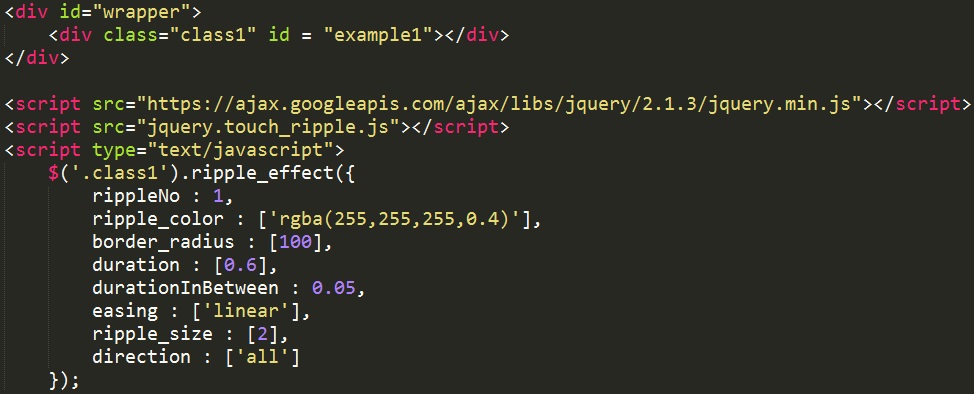
It works only on elements like button,div,li,p so if you want a ripple on any image then add image inside the div and use plugin on the div
*Functionalities used in the plugin*
rippleNo: Mention the Number of ripples you want.ripple_color: Mention the color of the ripple.It should be added inside'[]'.Mention the color of each ripple separately.For example, If you want 2 ripples of red and blue color then you should write "ripple_color:['red','blue']".You can use RGB or HEX color pattern.
border_radius:100 for circle ripple and 0 for square ripple.Don't forget to assign border_radius for every ripple.
duration: How long the ripple should last after clicking? 0.6 in the example indicates 0.6 seconds.
durationInBetween:This functionality is only used when more than one ripple are used.It indicates the duration gap between two ripples.Unit is second.
easing: easing indicates the speed curve of animation.'Linear' indicates speed remains same all the time.You can use other easing options like 'linear','ease','ease-in','ease-out','ease-in-out'.
ripple_size: How much ripple should grow during animation? '2' indicates ripple becomes twice the size at the end of animation.
direction: This functionality can be used to create side ripples.use 'up','down','left','right' to create one sided ripple.two sided ripple can be created by creating two ripples.Then, use "direction:['left','right']".One ripple will go left and another will go in right direction.Use 'all' for symmetrical ripple.
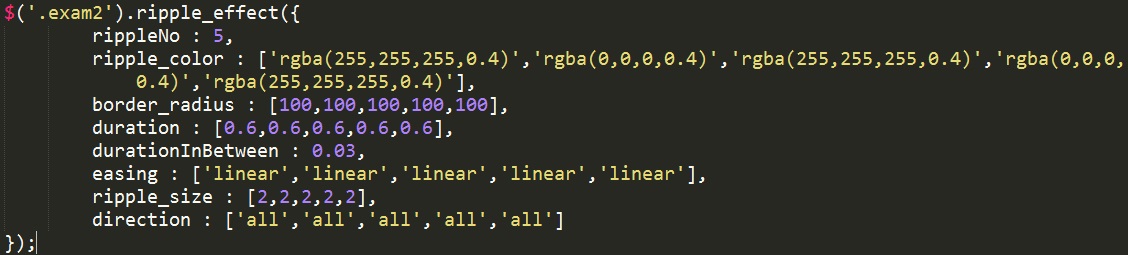
Following code will create multiple ripples shown in previous page.
If you have any query regarding the product feel free to ask questions in comment section of item.
I wiil be happy to help.If you prefer email method then you can mail me @ Milanshah1111993@gmail.com